How to send employees abroad
Send your own people to work in a new market for a set time: permits, social security, tax and the return.
For a company sending its own employees to another country for a set period, to start an operation, train a local team, serve a client or support a subsidiary.
On this page: In short
In short
In short
To send employees abroad, define the assignment and its length, secure the work permit, get a certificate that keeps the employee in the home social security system where an agreement allows it, apply the host country’s minimum employment terms, and check the income tax under the 183-day rule and whether the secondee creates a permanent establishment for you1,2,3,4. Then put the terms in an assignment letter and an agreement between the two companies, sign everything off at one checkpoint before the move, and plan the return.
The route in Promote:Global
Secondment · People-led
Commitment
Control
Risk
Rated 1 to 5, as the iPhone app rates every route when you choose one. The ratings are general, for the route itself: your own commitment, control and risk depend on your market, your product and your partners.
When it fits
Is secondment the right route?
A good fit when
- You need specific skills or company knowledge in the market for a defined period: a setup, training a local team, installing equipment or launching a subsidiary.
- The assignment has a clear end, and a planned return or handover.
- The move is within the EU, or between countries with a social security agreement, so the worker can stay in the home system5,6.
A poor fit when
- The role is really permanent: in the EU, most host employment terms apply after 12 or 18 months, and an A1 certificate covers 24 months at most1.
- The employee will lead sales or conclude contracts for you there, and nobody has reviewed the permanent-establishment risk3,4.
- The employee cannot get a work permit, or your company cannot meet the host country’s registration and notification duties1,2.
The people involved
Who’s involved and how they work together
- Your company to Secondee: Salary, package, return right
- Secondee to Host company: Work under agreed direction
- Host company to Your company: Recharge of the cost
- Your company to Host authorities: Permit, notices, filings
Step by step
How to send employees abroad, in 9 steps.
Each step says how companies do it, with sources, then what Promote:Global does there, or that the step is yours to do.
Discover
Step 1: Define the assignment, and choose who goes
Write down the purpose, the host company or client, the start and end dates, the role, who directs the work, who bears the cost and the planned return. Decide whether it is a business trip, a short assignment or a long relocation: the length changes the social security and tax outcome, and in the EU the posting rules count the months1,5.
What this step produces
- An assignment brief
Common mistake: Starting with a few months that quietly become years1,5.
You do this step yourself
The brief and the choice of person are yours. The plan opens with Define the secondment’s purpose & length and Choose who to send, which you tick when they are done.
Prepare
Step 2: Secure the work permit
Most countries require a work permit or visa for anyone working there, even an employee of a group company. The EU’s intra-corporate transferee permit lets managers, specialists and trainees from outside the EU be transferred to a part of their company in the EU. In Germany, for example, the person must have worked for the company for six months, and the permit runs for at least one year, up to three years for managers and specialists or one year for trainees, with a six-month wait before a new one2.
Short stays of up to 90 days in another member state are covered by a mobility notification instead2. Processing times and fees vary by country, and the official page for Germany gives neither, so start early.
What this step produces
- Work permit or visa application
- The approval
Common mistake: Letting the employee start working on a visitor or tourist status.
With Promote:Global
The plan’s Secure the work permit step carries Find an advisor for this market. On the project, Search for possible partners looks on the open web for immigration and global-mobility advisors, for 1 AI action, and Find service providers lists firms under immigration and work permits. Firms list themselves and Promote:Global does not check them; it applies for no visas or permits.
Prepare
Step 3: Apply the host country’s posting rules
Under the EU’s posting rules, a posted worker gets the host country’s core terms where they are better than home: pay including overtime, maximum working time, minimum rest, paid annual leave, health and safety, and equal treatment. After 12 months, or 18 with a motivated notification, most host terms apply, apart from dismissal and supplementary pensions1,5.
The employer must notify the host authorities before or when the posting starts, and for postings longer than four weeks give the worker written details: the country, the length, the pay currency, allowances and the return1,5. Germany, for example, asks employers based abroad to notify customs before the work starts, but only in listed sectors such as construction, catering and hotels, and cleaning7.
What this step produces
- The posting notification, where one is required
- Written information for the worker
Common mistake: Ignoring host minimum pay and leave because the worker is only temporary1,5.
You do this step yourself
Promote:Global holds no posting rules and files no notifications: you or your host-country advisor file them. The plan has no step for this, so add one after Secure the work permit (see Make the plan fit this route, below).
Prepare
Step 5: Plan income tax: the 183-day rule and the treaty
Article 15 of the OECD Model Tax Convention generally taxes employment income where the work is done, but exempts it in the host country when the employee is there for no more than 183 days in any 12-month period, the employer is not resident there, and the pay is not borne by the employer’s permanent establishment there3. Where the employee really works under the host company’s direction, the commentary allows the host company to be treated as the employer3.
EU guidance adds that someone working in a host country for more than six months is generally tax resident there, while the home country may still tax them if their home and ties remain5. The specific treaty and local law decide the result.
What this step produces
- A tax memo for both countries
- A daily record of days in each country
Common mistake: Counting days in one tax year, when the treaty test is any 12-month period3.
You do this step yourself
Promote:Global gives no tax advice. Your tax advisor writes the memo for both countries, and keeping the record of days is yours.
Prepare
Step 6: Set up payroll and withholding in both countries
Where the home company keeps paying the salary but host tax or social security applies, the host country may require withholding and reporting there, and many companies run a payroll in the host country for that alongside the home one. Rules differ: in the UK, for example, an employer with a UK presence usually operates PAYE for non-resident staff working in the UK, with modified arrangements for short-term business visitors and tax-equalized staff9,10.
For people leaving the UK, PAYE generally continues, and the employer keeps deducting UK National Insurance where a certificate of coverage applies6. Decide whether you equalize tax, so the employee pays no more than at home, or pay a net salary.
What this step produces
- A payroll plan for both countries
- A tax equalization or net-pay policy
Common mistake: Ignoring host withholding duties until the first audit.
You do this step yourself
Promote:Global runs no payroll: your payroll provider or accountant in each country sets it up.
Prepare
Step 7: Check whether the secondee creates a taxable presence
HMRC’s view is that a secondment does not normally create a permanent establishment of the sending company when the secondee carries on the host company’s business under its control; but where the secondee provides a service to the host company, and the cost is marked up, the sending company may have a fixed place of business there4. HMRC points to the employer factors in the commentary on Article 15: who instructs the worker, controls the place of work, provides the tools, can select and dismiss, and sets holidays and schedules, and how the fee between the companies relates to the employee’s cost3,4.
Separately, under Article 5, a person who habitually concludes contracts for your company in the host country can create a permanent establishment there3.
What this step produces
- A permanent-establishment assessment
Common mistake: Letting a secondee lead sales in the host country while employed by the sending company3,4.
With Promote:Global
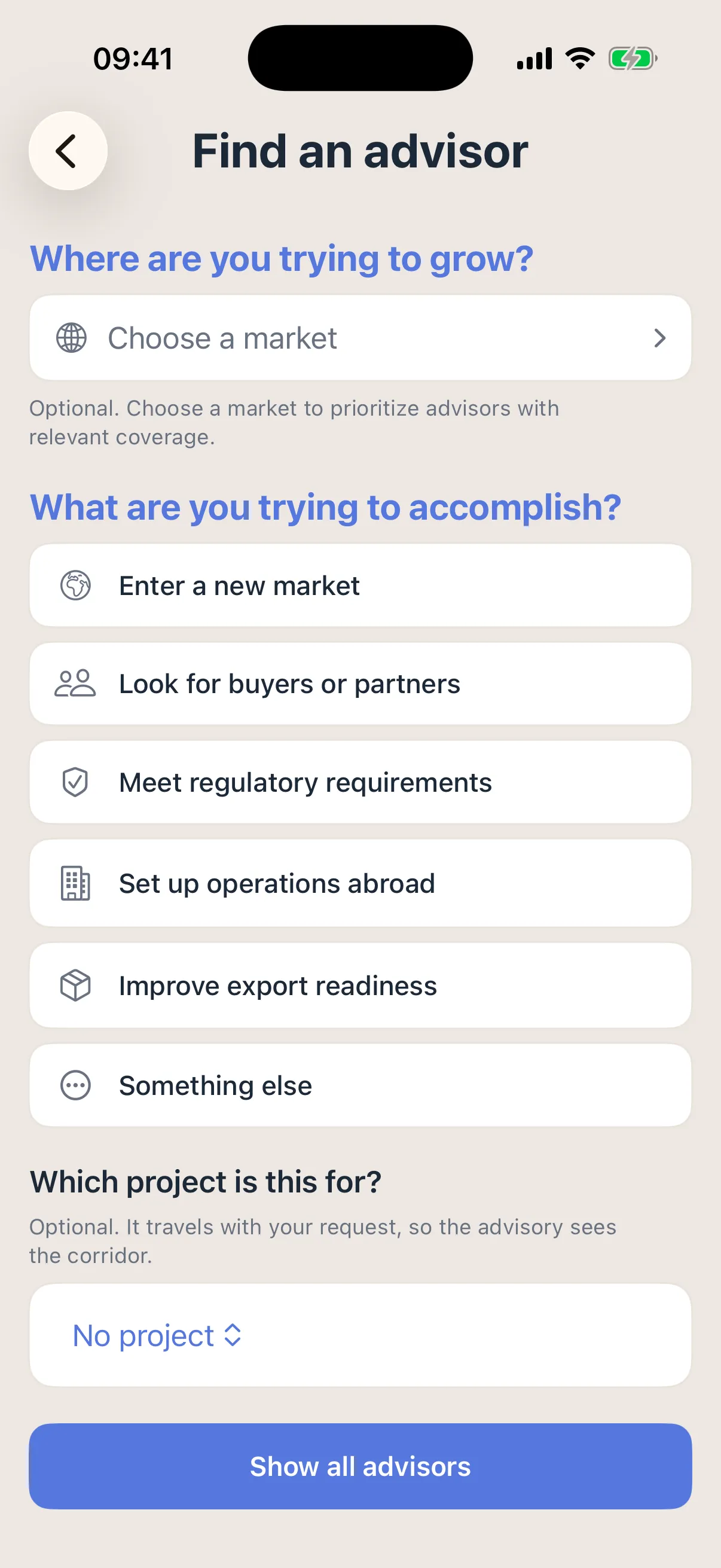
The plan’s Check whether the work creates a taxable presence step carries Find an advisor for this market. The advice comes from the firm you choose, not from Promote:Global.
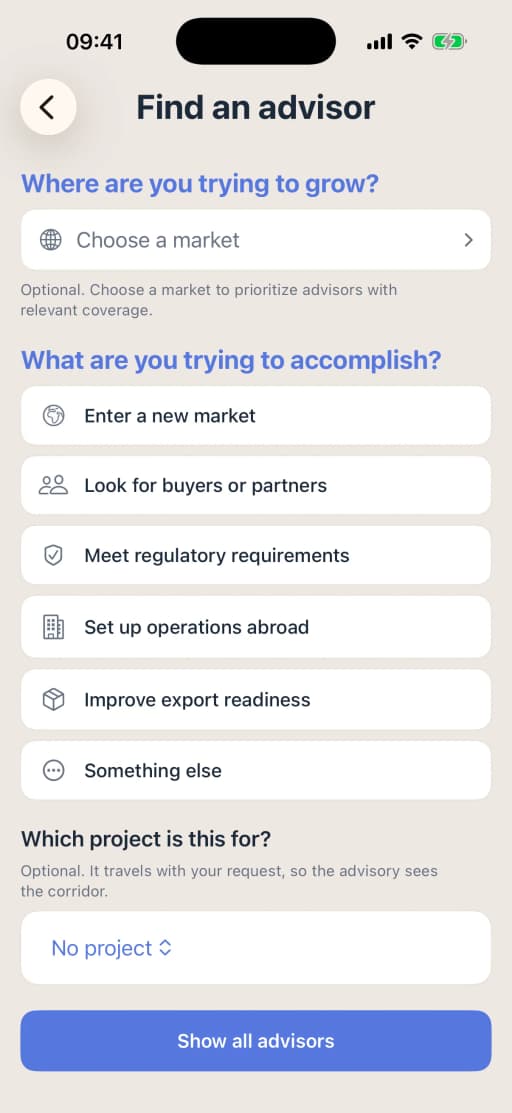
Asking an advisor for help on iPhone, with the project attached. Prepare
Step 8: Sign off the move before departure
Bring everything together at one checkpoint, and book the move only when every item is in place: the work permit approved; the social security certificate issued or applied for; the posting notification filed where one is required; payroll and withholding set up in both countries; health and other insurance for the employee and any family; and the return written down1,2,6.
Two documents carry the terms. The assignment letter to the employee covers the purpose and term, the location, the role and reporting line, pay and allowances such as housing, schooling and relocation, the tax and social security treatment, benefits and insurance, hours, the role on return, termination, confidentiality, intellectual property and data protection. The agreement between the home and host companies says who directs the work and who carries each cost, and how the cost is recharged; it should match what really happens, since that is what the tax tests look at3,4.
Family rules differ by permit: in Germany, the family of an intra-corporate transferee can follow under the Blue Card family rules, but not for a short-term mobility stay2. The deadline tracker under What to budget for, below, lists the dates for a UK company sending a manager to its German subsidiary, and who acts on each.
Before choosing who goes
- What
- The manager needs at least six months with the company before applying for the intra-corporate transfer card2
- Who
- You
Before the transfer
- What
- Work permit: the employee applies with the company’s documents, and the Federal Employment Agency must approve unless an exemption applies; the official page gives no processing time2
- Who
- The employee, with your documents
Before departure
- What
- Certificate of coverage (PDA1): HMRC’s guidance gives no deadline and no processing time, so apply in good time8
- Who
- You or the employee
Before the work starts
- What
- Posting notification to German customs, in the listed sectors only7
- Who
- You, as the employer
At departure
- What
- Keep UK PAYE running, and give the employee a letter showing the departure date, gross pay and tax deducted to date6
- Who
- Your payroll
From arrival
- What
- Count the days in Germany: the OECD Model’s test is any 12-month period, and the treaty between the two countries sets the exact one3
- Who
- The employee keeps the record; your tax advisor reads it
Before twelve months in Germany
- What
- Further German working conditions apply after twelve months; to extend that to 18, send a reasoned notification to German customs before the twelve months end11
- Who
- You
At two years
The deadline tracker for a UK company sending a manager to its German subsidiary, in the order the dates fall When What Who Before choosing who goes The manager needs at least six months with the company before applying for the intra-corporate transfer card2 You Before the transfer Work permit: the employee applies with the company’s documents, and the Federal Employment Agency must approve unless an exemption applies; the official page gives no processing time2 The employee, with your documents Before departure Certificate of coverage (PDA1): HMRC’s guidance gives no deadline and no processing time, so apply in good time8 You or the employee Before the work starts Posting notification to German customs, in the listed sectors only7 You, as the employer At departure Keep UK PAYE running, and give the employee a letter showing the departure date, gross pay and tax deducted to date6 Your payroll From arrival Count the days in Germany: the OECD Model’s test is any 12-month period, and the treaty between the two countries sets the exact one3 The employee keeps the record; your tax advisor reads it Before twelve months in Germany Further German working conditions apply after twelve months; to extend that to 18, send a reasoned notification to German customs before the twelve months end11 You At two years The certificate of coverage is for temporary work of up to two years8; the transfer card runs up to three years for a manager, then six months outside Germany before a new one2 You, at the review What this step produces
- An assignment letter signed by the employee
- A secondment or recharge agreement between the companies
- A pre-departure checklist, every item done
Common mistake: Promising a package without saying who bears the host country’s taxes.
With Promote:Global
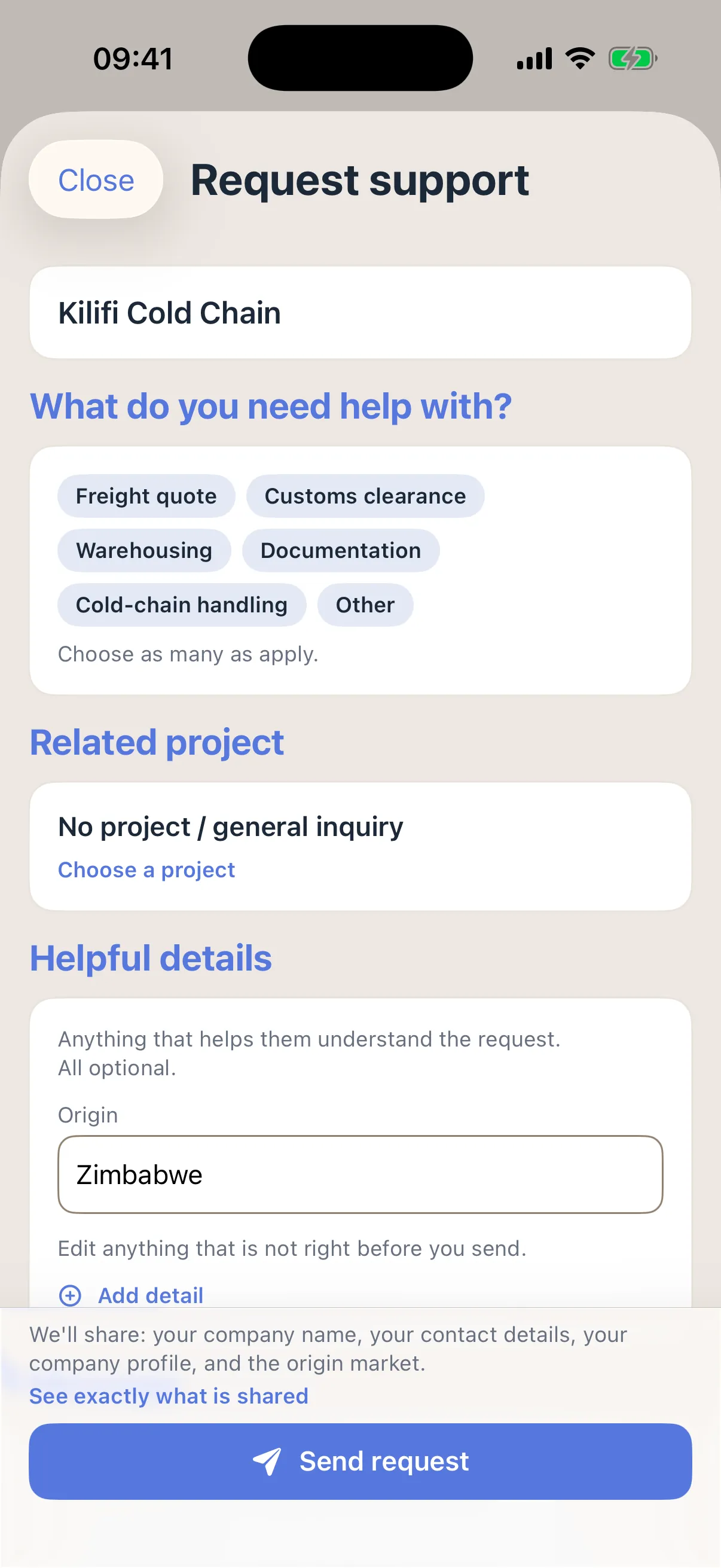
The plan’s Relocate & start work step carries Find service providers, with firms that list themselves under relocation, and immigration and work permits; a request to a firm carries your company’s contact card, shown before you send it, and the firm answers in Messages. Add this sign-off as a step just before it, with each item as a subtask, so the move waits until all are done. Promote:Global drafts no letters or agreements and arranges no insurance: your HR team, counsel and insurer do.
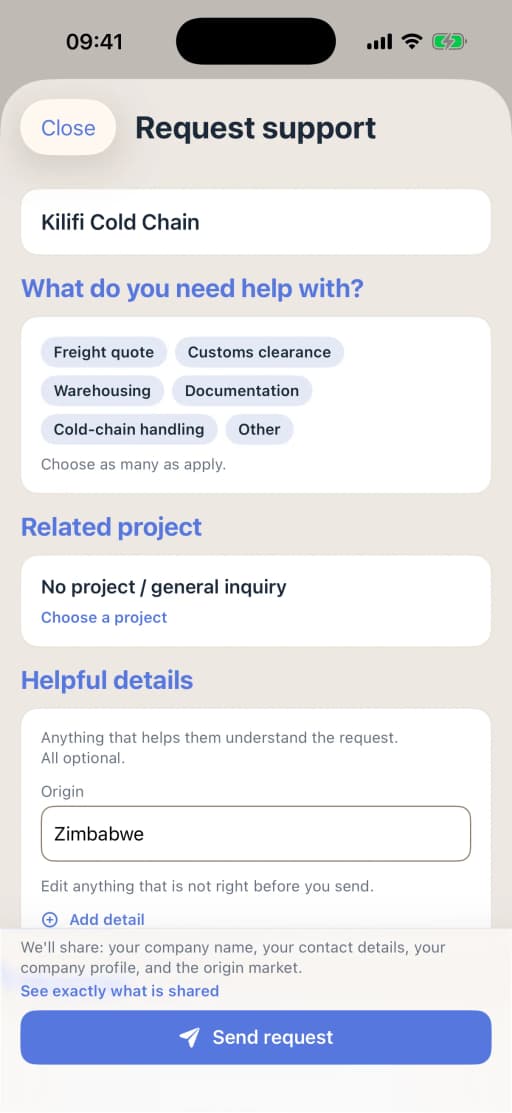
A request to a listed firm on iPhone, showing what it will share. Grow
Step 9: Plan the return, or convert to a local contract
Plan the return before it is due: the role, the pay grade, housing and the tax filings on leaving. If the assignment becomes permanent, move the person to a local contract, which changes their social security and the host law that protects them. In the EU, review each posting before the 12-month, 18-month and 24-month marks1.
What this step produces
- A repatriation plan or a local employment contract
- Final tax returns
Common mistake: No return role defined, so the employee leaves on coming home.
With Promote:Global
The plan ends with Review & decide the next step. If the work becomes permanent, a new project on the Local hire via EOR or Wholly-owned subsidiary route gets that route’s own checklist, and First hire compares an employer of record, a contractor and your own company in the country.
Your plan in Promote:Global
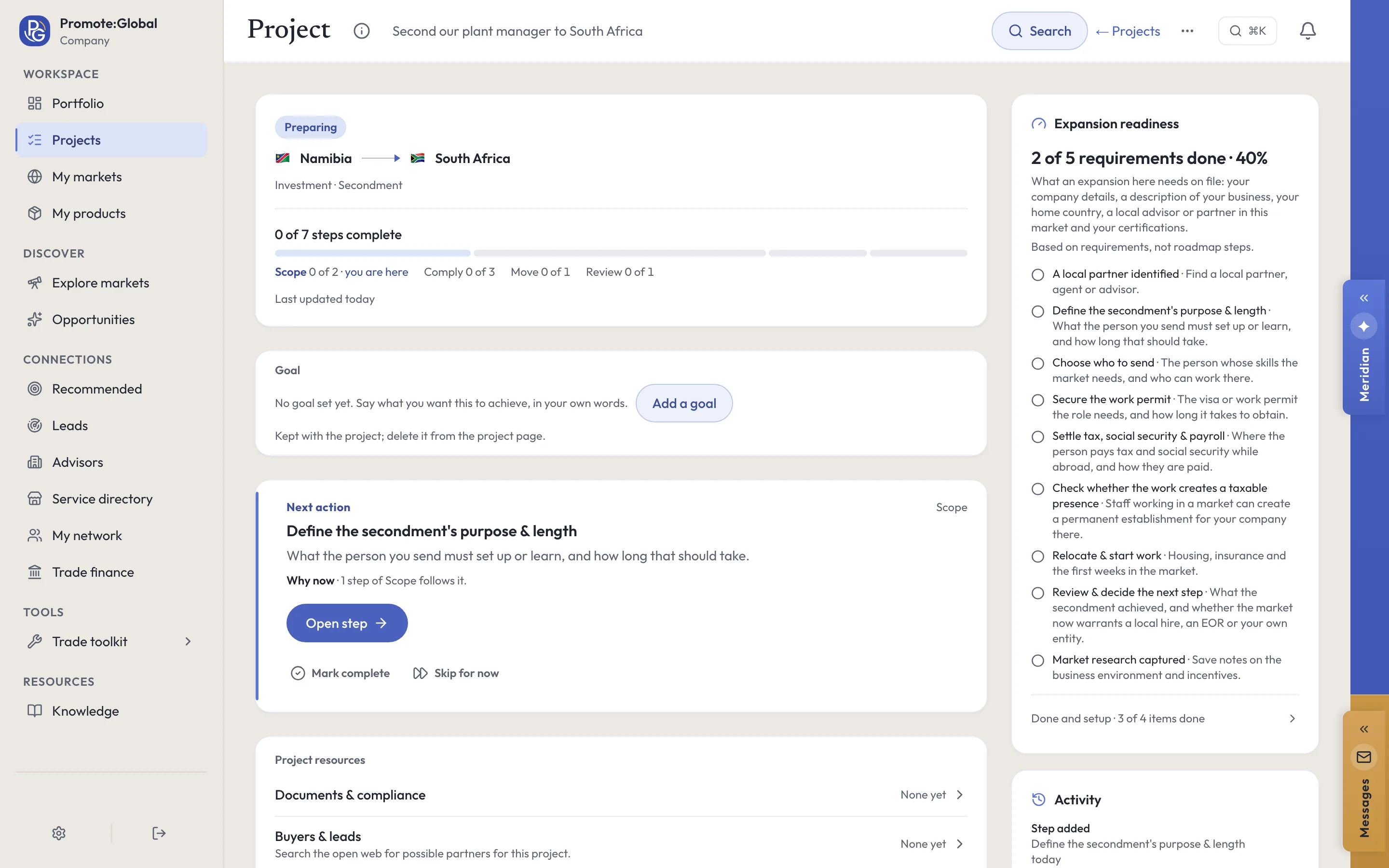
What a secondment project looks like.
Create a project, choose “Secondment” under “How are you entering?”, and Promote:Global writes this plan for your product and market. The web lists the route; on iPhone, the route advisor or Meridian sets it. You tick steps off, skip one for now or add your own.
Scope
- Define the secondment’s purpose & length
- Choose who to send
Comply
- Secure the work permitButton: Find an advisor for this market
- Settle tax, social security & payrollButton: Find an advisor for this market
- Check whether the work creates a taxable presenceButton: Find an advisor for this market
Move
- Relocate & start workButton: Find service providers
Review
- Review & decide the next step
The plan is the route’s own checklist, with no customs steps by default. Where the work moves goods across a border, such as equipment, ingredients, samples or branded supplies, add those steps yourself. You can add, reorder and skip steps. In your own project, each step names your product and your countries. Building the plan uses no AI action.
On a project, Search for possible partners looks on the open web for immigration or global-mobility advisors, or for whoever you describe, ranked by fit, for 1 AI action. A result is a lead to check before you contact anyone, not a confirmed partner.
Make the plan fit this route
The plan for this route is its own checklist, from the secondment’s purpose to the review, and it goes from the permit, tax and presence steps straight to “Relocate & start work”, with no step for the host country’s posting rules and no sign-off before the move. Add these two, so the move waits until the permit, the certificate, payroll, insurance, the letters and the return are all in place.
- Apply the host country’s posting rules and file any notification (in Comply, after “Secure the work permit”)
- Sign off the move before departure (after “Check whether the work creates a taxable presence”, just before “Relocate & start work”, with the letter, the agreement, the permit, the certificate, payroll, insurance and the return as its subtasks)
On the project, type a step into Add a step under the roadmap, or ask Meridian to propose them: a step Meridian proposes is added only when you accept its card.
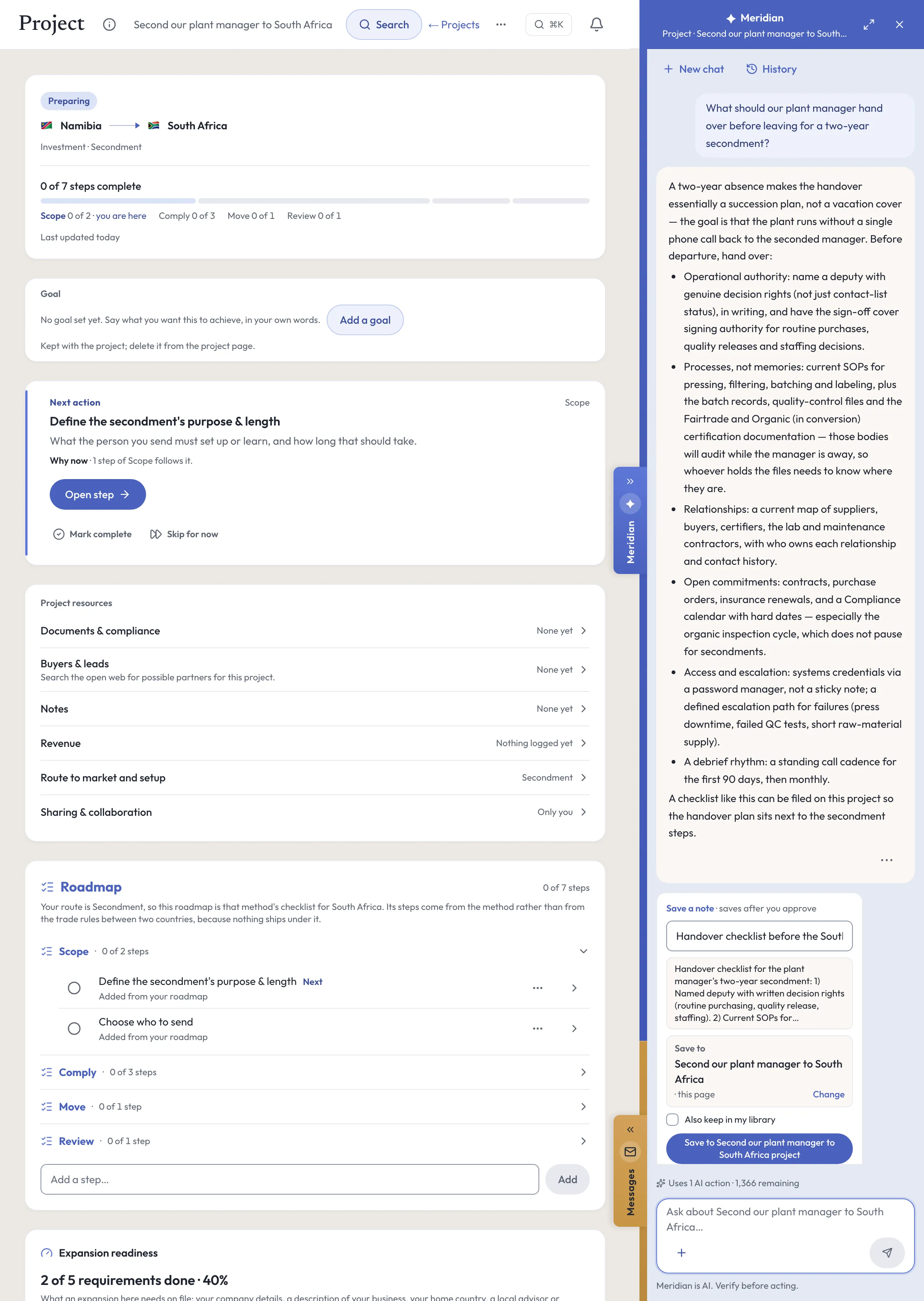
Meridian
Meridian, on your secondment project.
Meridian, the built-in AI assistant on the web and on iPhone, reads the project you have open: its route, its countries, the steps still open and your notes. It answers questions about them, and it proposes changes as cards. Nothing changes on the project until you accept a card. Ask it to search for possible partners and it runs the project’s search in the conversation, looking on the open web for immigration or global-mobility advisors, for 1 AI action; every result is a lead to check.
Ask
- What’s the next step on this project?
- What’s blocking this project?
- Does sending our manager create a taxable presence there?
Do
Add a step — to this plan, as a card you accept
Save a note — to the project
Set entry method — one of the eighteen routes, with its reason, if another fits you better
Every plan carries a monthly allowance of AI actions, and each question uses 1. Building the plan uses none, and neither do First hire. Meridian is AI. Verify before acting.
Documents
The paperwork.
- Assignment letter and secondment agreement
- The employee’s terms, and the agreement between the home and host companies on direction and recharge3,4.
- Work permit or visa
- With any intra-corporate transferee or mobility registration2.
- Posting notification and written information
- Filed with the host authorities where one is required, and, in the EU, given to the worker for postings over four weeks1,7.
- Social security certificate
- An A1 within the EU, or a certificate of coverage, such as the UK’s PDA1 for work in the EU1,8.
- Tax memo and payroll policy
- The treaty position in both countries, and whether tax is equalized3.
- Permanent-establishment assessment
- Especially for secondees in sales or management roles4.
- Days-in-country record
- A daily log for each tax year and each rolling 12 months3.
- Relocation and return agreements
- Housing, insurance, schooling, and the role on return.
Costs and timelines
What to budget for.
Get quotes for
- Work permit and immigration advice
- Moves with the permit type, whether family members apply with the employee, and whether an advisor prepares the file. The official page for Germany gives no fee2.
- Tax advice in both countries
- The treaty position, the day count, the permanent-establishment review and any equalization. Moves with the length of the stay and how far the role reaches into sales or management3,4.
- Payroll in the host country
- Where withholding or reporting is due there. Moves with the number of people and countries, and with the pay frequency9,10.
- The package
- Housing, schooling, relocation and any tax equalization. Moves with the family, the city and your assignment policy.
- Insurance
- Health cover for the employee and any family, and any other cover the assignment needs. Moves with the country, the family and the length of the stay.
- The return
- The move home, or a local contract if the assignment becomes permanent.
What sets the timing
- The dates that set the timing are in the deadline tracker in the step "Sign off the move before departure", for a UK company sending a manager to its German subsidiary; where no official page gives a lead time, none is given.
- The permit and the certificate of coverage are the long poles: the official pages give no processing times, so start both as soon as the assignment is agreed2,8.
Ask for each quote in writing, for your product, market and volumes. Prices and timings differ by country, provider and year.
Mistakes and best practices
What goes wrong, and what works.
Common mistakes
- Changing the assignment, with a longer stay, a new site or a new role, without updating the permit, the notifications and the certificate.
Best practices
- Use one assignment policy for packages, tax equalization and return rights, so two people sent on the same route get the same terms.
- Give each date on the tracker one named owner, in HR, in payroll or with your tax advisor, and a reminder well ahead of it.
Questions
Questions people ask.
What is the 183-day rule?
Under Article 15 of the OECD Model, pay for work in a host country is taxed only at home if the employee is there for no more than 183 days in any 12-month period, the employer is not resident there, and no permanent establishment of the employer there bears the pay3. The treaty between the two countries sets the exact test.
What is an A1 certificate?
The EU’s Portable Document A1, issued by the home social security institution, which keeps a posted worker insured at home for up to 24 months1,5. From the UK, HMRC issues a certificate of coverage, also called a PDA1, for up to two years8.
How long can I post a worker within the EU?
Up to 12 months, or 18 with a motivated notification, before most host-country employment terms apply1,5.
Do I need a work permit for a temporary assignment?
Usually yes, even for an employee of a group company. The EU’s intra-corporate transferee permit is one route, for staff from outside the EU2.
Sources
Where this guide comes from.
- [1]Posted workers in the EU: guidelines and social security rules · Your Europe, European Commission
- [2]Intra-corporate transferee (ICT) in Germany · EU Immigration Portal, European Commission
- [3]Model Tax Convention on Income and on Capital: condensed version · OECD, 2017
- [4]INTM264440: secondment and permanent establishment · HM Revenue & Customs, International Manual
- [5]Posted workers abroad on short assignments · Your Europe, European Commission
- [6]Employees working abroad · HM Revenue & Customs, GOV.UK, 2026
- [7]Notification of posted workers · German Customs (Zoll)
- [8]National Insurance for workers from the UK working in the EEA or Switzerland · HM Revenue & Customs, GOV.UK, 2024
- [9]PAYE81900: modified PAYE arrangements for internationally mobile employees · HM Revenue & Customs, PAYE Manual
- [10]PAYE81530: international employments overview · HM Revenue & Customs, PAYE Manual
- [11]Postings of more than twelve months: extension of the period · German Customs (Zoll)
Reviewed October 26, 2026. This guide is general information about how companies do this, written in our own words from the sources above; it is not legal, tax or financial advice. Rules differ by country and change, so check them with the authority or an advisor before you act. What it says Promote:Global does is what the product does today. The screens on this page come from our demo workspace, and the companies in them are invented.
Read next
Related guides.
- How to hire abroad without an entity
Local hire via EOR · People-led
- How to set up a subsidiary abroad
Wholly-owned subsidiary · Investment / FDI
- How to build a remote team abroad
Remote / distributed team · People-led
All eighteen guides Promote:Global for international expansion Plans and prices
Start your secondment project.
Sign up, add what you sell, then create a project and choose “Secondment” under “How are you entering?”. The plan above is written for your product and market.
Start this projectFree to start. No credit card needed. See plans and prices