
Tools
The Trade toolkit in the sidebar is the index of everything you can run. Each tool answers one question. Most of them are free, and the index tells you which are not before you open anything.
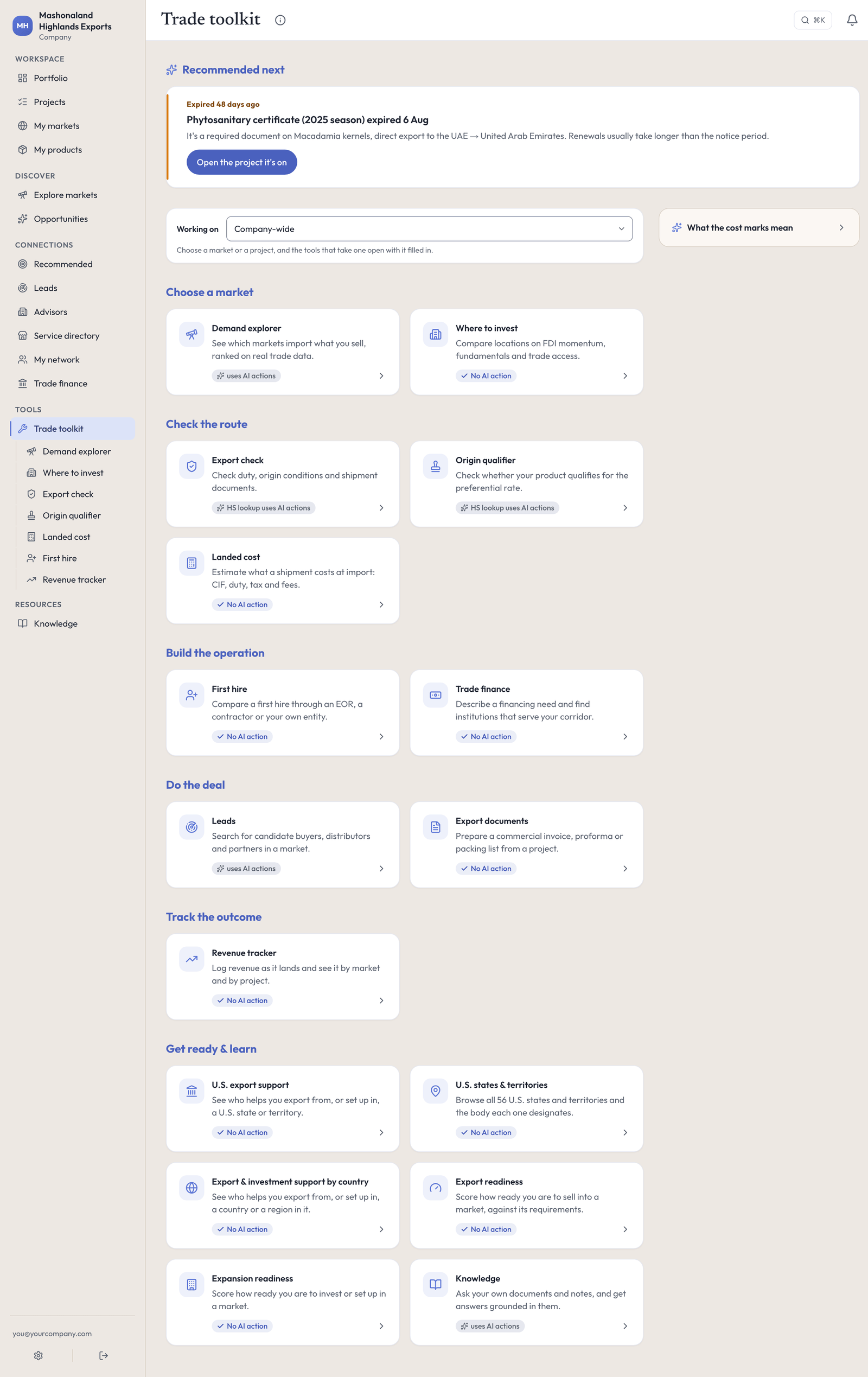
The tools follow the work, in the order it happens: Choose a market (Demand explorer, Where to invest), Check the route (Export check, Origin qualifier, Landed cost), Build the operation (First hire, Trade finance), Do the deal (Leads, Export documents) and Track the outcome (Revenue tracker). A last group, Get ready & learn, holds the rest: the two readiness scores, the three export and investment support pages, and Knowledge. Every card carries No AI action, uses AI actions, or HS lookup uses AI actions, which means the tool itself is free and only finding a code for you costs anything.
Above the tools, Working on starts at Company-wide. Set it to one of your markets or active projects and the tools that take a product or a destination open with it filled in: a market opens Export check on your country and that destination, and a project adds its product and HS code. A line under the control says exactly what the tools will open with.
You rarely need to come here. Steps in a project open the right tool with your HS code and your country already in it, and the step says so.
Demand explorer
Which countries actually import what you sell? It ranks markets on real import data, in four lenses: best fit, biggest demand, premium price, and balanced. Costs AI actions.
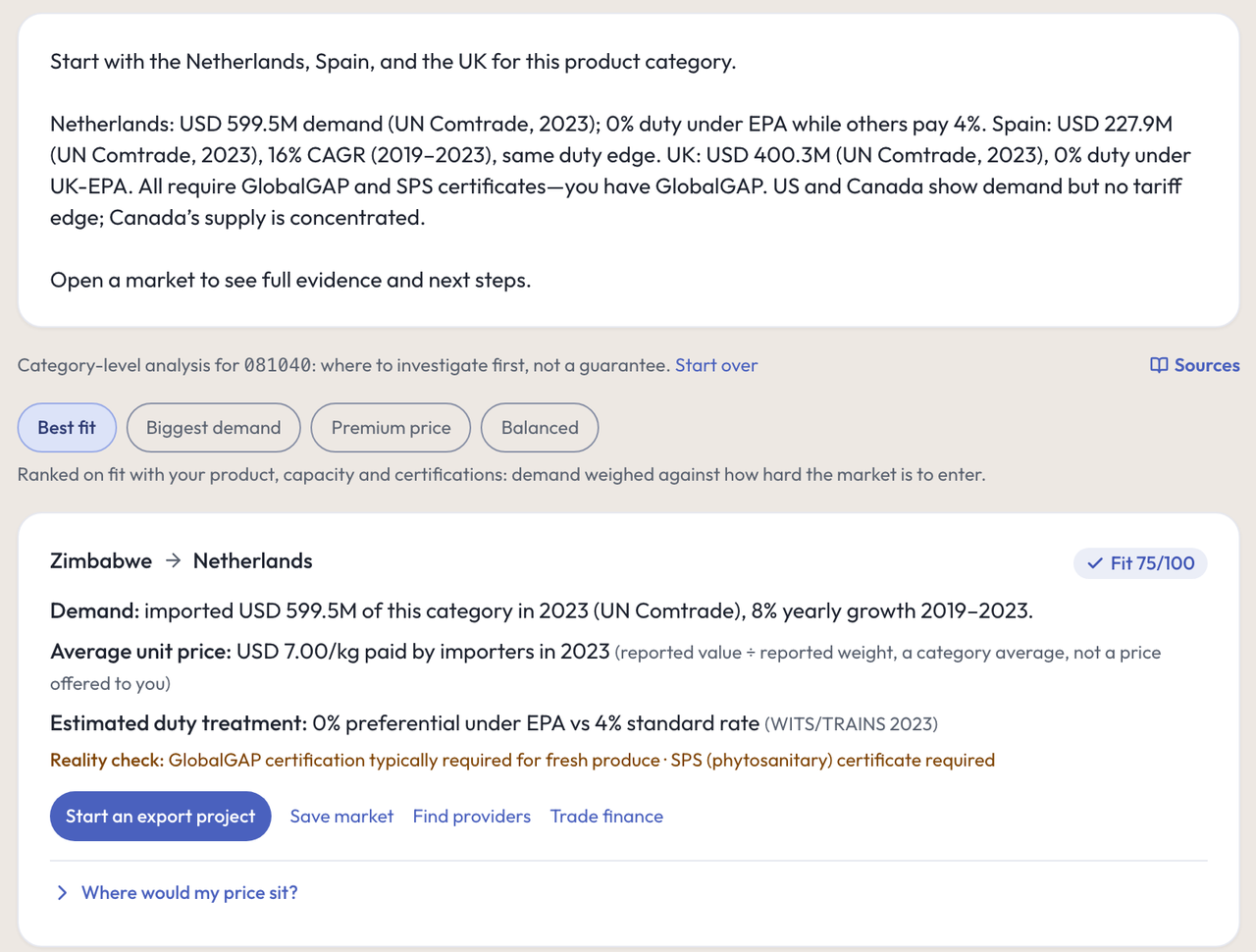
For blueberries, HS 081040, it returned the Netherlands, Spain, the United Kingdom, the United States and Canada. Each card gives the import value and its growth, the average unit price importers paid, the duty treatment with the source, and a reality check — for this product, that fresh produce typically needs a food-safety certification and a plant-health certificate. From any card you can start an export project, save the market, find providers or open Trade finance.
Two things to know. A run takes about two minutes. And the tool ranks markets, so markets you already work are treated as benchmarks and never recommended back to you — which means it cannot answer “how much does South Africa import” when South Africa is already one of your markets. For that question, use Export check and the country page.
Export check
What duty will I pay, and what paperwork does this shipment need? Free, except finding a code for you. Give it an HS code, an origin and a destination, plus the shipment assumptions that decide the document set: transport mode, payment method, Incoterm and named place.
It answers with the applied duty, marked Live, with the source and year on it — 0% MFN duty · Source: WTO Timeseries · 2025 for blueberries into South Africa. Under it: the origin status, a document dossier naming every document, who is responsible for it, who issues it and when it is needed, and a set of pre-shipment checks run against what you entered (an Incoterm with no named place fails, and it says that blocks the shipment).
The page is clear about what it is not: guidance, not a customs ruling, and Promote:Global doesn’t hold your paperwork, so no row can say whether you already have it. Results can be saved to a project.
Origin qualifier
Does my product actually qualify for the lower agreement rate? Free, except the code lookup. A preferential duty rate is only real if your goods meet the agreement’s origin rule, and this is the check that decides it.
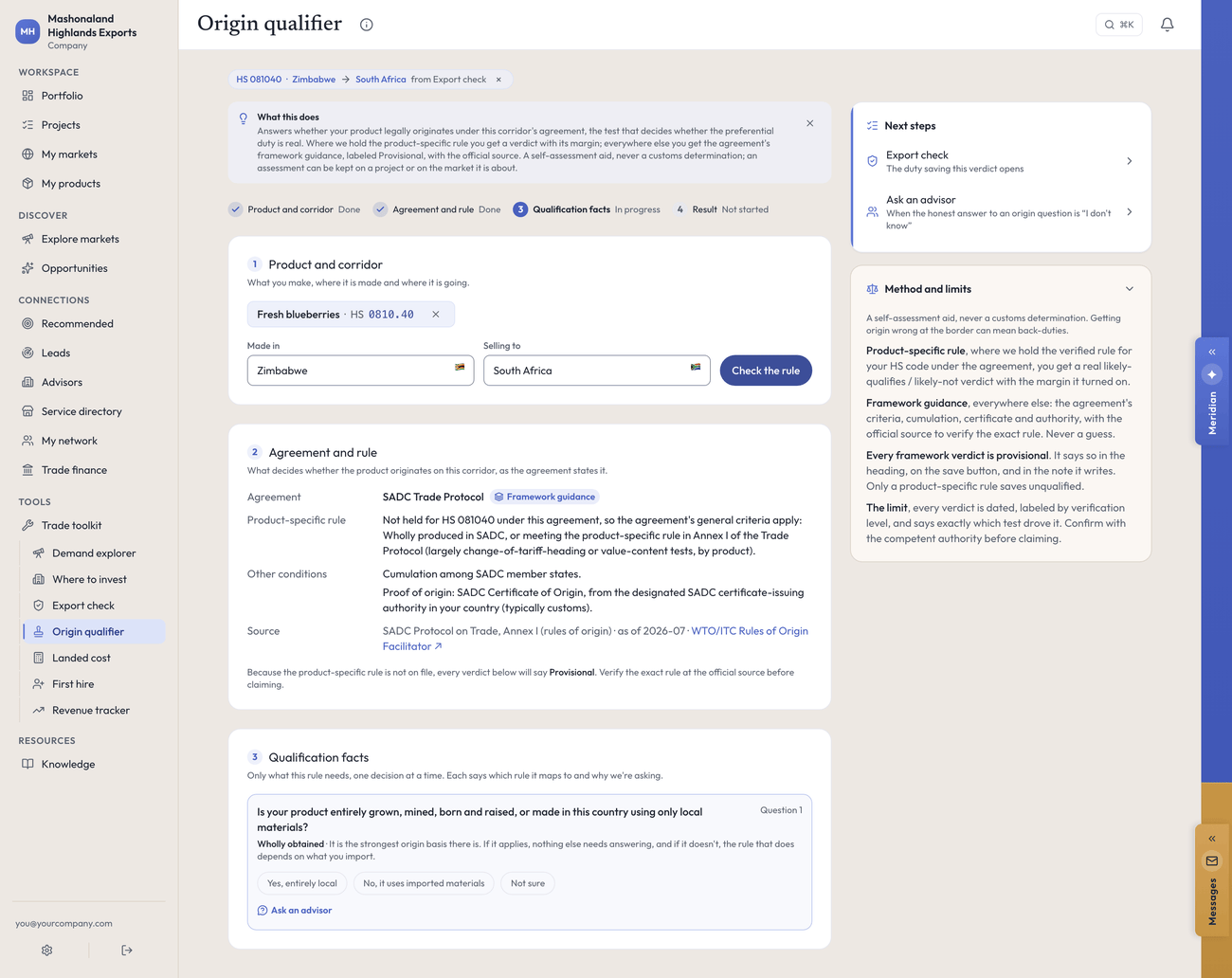
It names the agreement that governs the corridor, tells you whether it holds the product-specific rule for your code, and then asks guided questions one at a time — starting with whether the product is entirely grown, mined, born and raised or made in your country using only local materials. Each question says which rule it maps to and why it is being asked.
Its Method and limits panel is the most useful paragraph in the toolkit: this is a self-assessment aid and never a customs determination, and getting origin wrong at the border can mean back-duties. Where it only holds the agreement’s framework rather than the rule for your code, every verdict says Provisional, in the heading, on the save button and in the note it writes.
If Export check and the Origin qualifier disagree, the Origin qualifier is the one about origin. On a duty-free line the whole question is often moot anyway — if the standard rate is already 0 percent, a certificate proving you qualify for a preferential 0 percent buys you nothing. Where money turns on it, ask an advisor.
Landed cost
What does this shipment cost by the time it lands? Free. Enter the goods value, freight, insurance, a duty percentage, the destination tax rate and any other fees, and it builds the customs value (CIF) and the estimated cash the shipment needs at import.
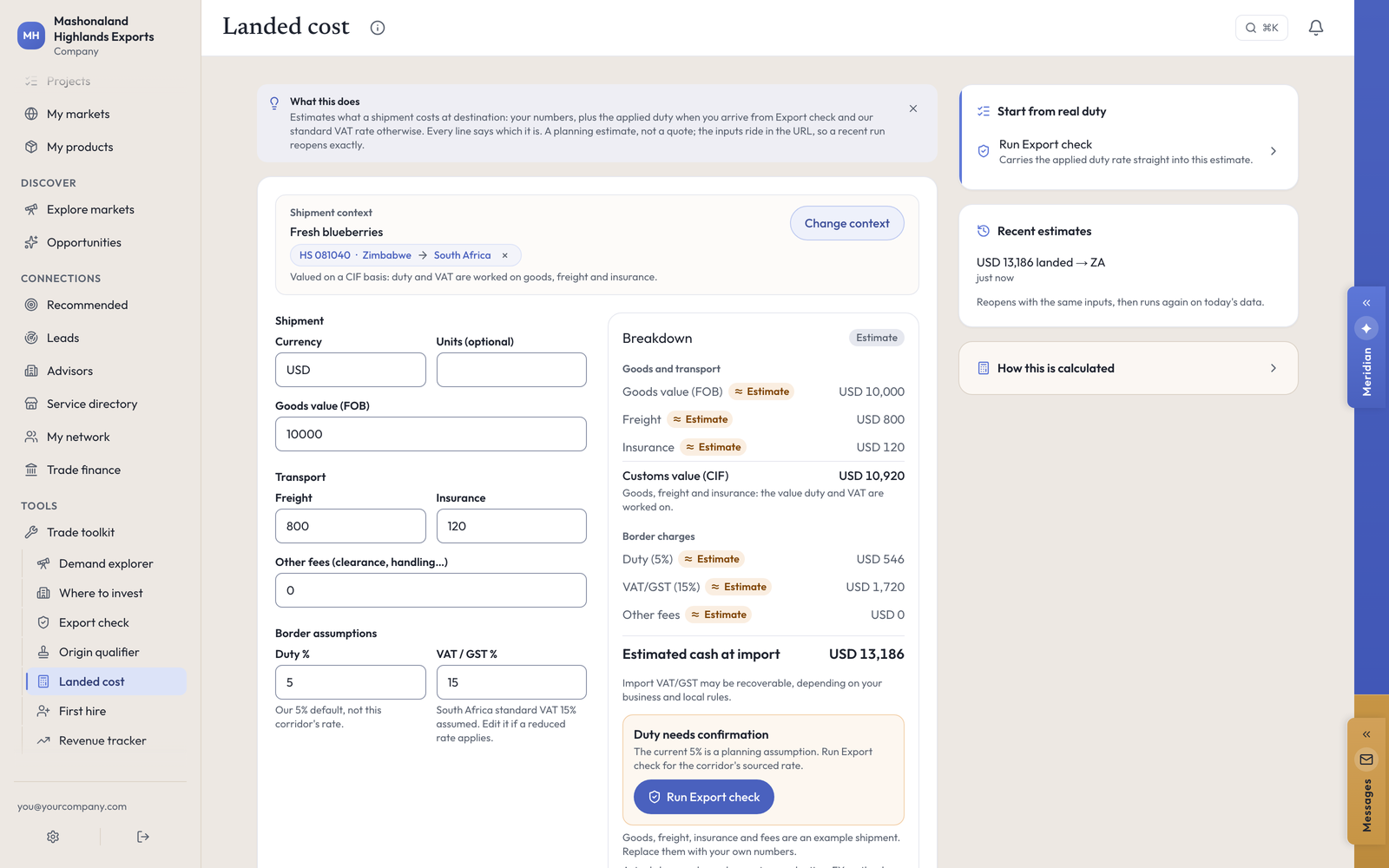
Every line is labeled Estimate or entered by you, and the page names its own assumptions: South Africa standard VAT 15% assumed. Edit it if a reduced rate applies. It opens with a placeholder duty of 5 percent and says so in a card — that is our default, not your corridor’s rate. Run Export check first, then use its Estimate landed cost with this duty button so the real rate carries across. You can save a scenario to compare, and save the estimate to a project.
Where to invest
Which location should I set up in? Free. It compares locations on investment momentum, fundamentals and trade access, for when the question is where to put an entity rather than where to send a container. [not exercised — described from the toolkit index; this run did not open it.]
First hire
What does a first person in that country really cost? Free. It covers the all-in cost, the rules that bite, and employer of record against setting up an entity. [not exercised — described from the toolkit index; this run did not open it.]
Revenue tracker
What have I actually earned, by market, against the target I set? Free. You log revenue on a project, in the Revenue drawer under Project resources: the market, the amount, the currency, the date and a buyer label. Mashonaland Highlands logged six events totaling $647,200 that way, and they rolled up correctly on the market pages and the Portfolio.
The Revenue tracker tool is the same figures gathered in one place. [not exercised — logging revenue on a project was; the tool page itself was not opened on this run.]
The rest of the toolkit
These carry their own descriptions on the index and were not opened on this run. [not exercised, all of this section.]
- Export documents — a pre-filled commercial invoice, proforma or packing list for any project. Free.
- Export readiness and Expansion readiness — how ready you are to sell into, or set up in, a market, scored against that corridor’s own requirements. Free.
- Knowledge — your own library, answered: grounded in the documents and notes you have saved. Costs AI actions.
- U.S. export support, U.S. states & territories and Export & investment support by country — which public body a place assigns, what it publishes, and when the record was last checked. Free.
Leads and Trade finance also sit in the toolkit; they have their own pages in this guide.
In the console
Each of these pages carries an (i) beside its title. This is what it says, and where it sends you next.
- Trade toolkit
Every tool you can run; the ones marked “uses AI actions” count against your allowance.
- Demand explorer
Which markets import what you sell, ranked on real trade data, in four lenses.
- Export check
Applied tariffs, rules of origin and the documents your shipment needs.
- Origin qualifier
Check whether your product legally originates for the preferential duty.
- Landed cost
Estimate the cash a shipment needs at import: CIF, duty, tax and fees.
- Where to invest
A country-level comparison to run before site, tax, legal and commercial due diligence.
- First hire
Compare employment cost, setup time, control and key risks across countries and models.
- Revenue tracker
Revenue you have logged, by market and by project.
- Export documents
A pre-filled invoice or packing list, drawn from a project's own corridor.
- Export readiness
How ready you are to sell into a market, against that corridor's own requirements.
- Expansion readiness
How ready you are to establish in a market: intent, partners and the regulatory work.
- Knowledge
Your own reference library, and the part of it Meridian is allowed to quote.
What to do next
- Run Export check on your best product into your best market. It is free and it takes a minute.
- Take its duty rate straight into Landed cost using the button on the result.
- Then find the buyer: Finding people.
- Or fund the shipment: Trade finance.