
Finding people
The sidebar has five doors under Connections, and they answer five different questions. Knowing which is which saves a lot of time.
- Recommended — firms already on Promote:Global, ranked against your company.
- Leads — a live search of the open web for companies that might buy what you sell.
- Advisors — consultancies you can ask for scoped, paid help.
- Service directory — the firms that do the work: freight, customs, inspection, certification.
- My network — the organizations you already deal with, kept privately by you.
Leads
This is the one to use when you need a name and a phone number. You give it a target market, who you are looking for (distributor, wholesaler, processor, retailer, agent) and which of your products it is about. Optional filters narrow the search itself: a city, certifications, a working language, a business type.
It costs one AI action and it is slow — about three minutes — because it is reading the open web while you wait.
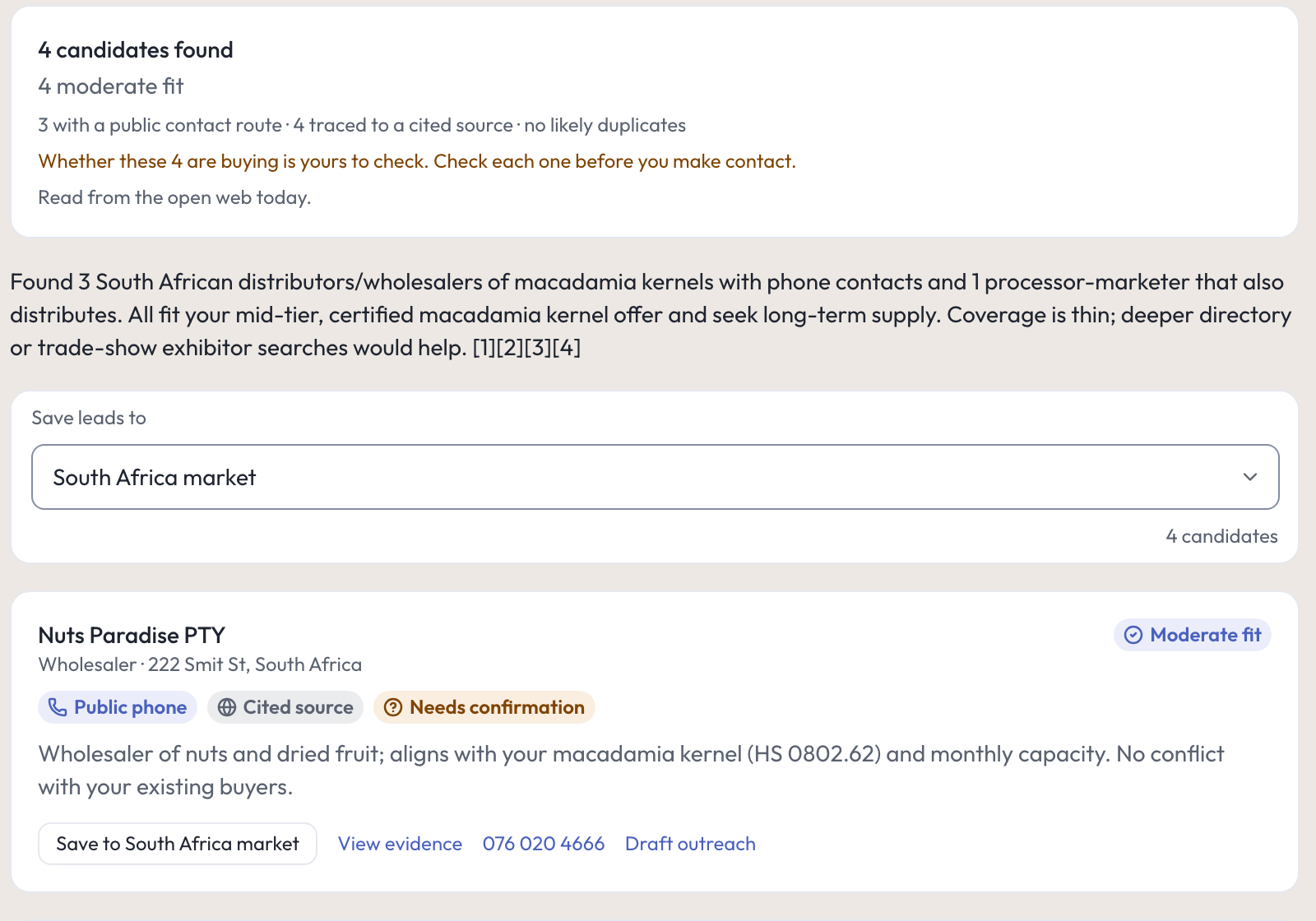
Read the summary line above the results before the results themselves. For Mashonaland Highlands, searching South Africa for macadamia distributors, it read: 4 possible buyers found · 4 moderate fit · 3 with a public contact route · 4 traced to a cited source · no likely duplicates, then in orange: Whether these 4 are buying is yours to check. Check each one before you make contact.
Each card carries:
- the firm, what it does and where it is;
- a fit level, and badges saying whether a public phone number was found and whether the entry traces to a cited source;
- a sentence on why it was returned, in terms of your own product and capacity;
- Save to a project or a market, the phone number itself, View evidence, and Draft outreach.
Where it found nothing it says so plainly — on one card, No direct contact details in source; verify via the industry body or company website. At the foot it lists suggested follow-ups and the sources it opened.
These are leads, not customers. Promote:Global has no list of buyers to look you up in. This search reads public pages on the day you run it and tells you what it saw and where. Everything after that is your call, your email and your phone bill.
The Service directory
Firms that do the operational work: freight and logistics, customs and compliance, certification and inspection, market research, legal. Filter by category and location.
A listing is a registration. The firm added itself, or a trade agency added it, and Promote:Global has not checked it on your behalf. A listing can carry a tag saying a named trade agency vouches for the firm, which points at that agency’s judgment rather than ours — see Providers & advisors for how that tag works. Ranking on a firm’s page (Good fit, and the reasons under it) is our ranking against your markets and services, and nothing more.

A firm’s page gives you three doors, and they do different things:
- Message provider opens a thread. They reply in the thread and share full contact when they are ready.
- Request introduction asks for a formal introduction. If the firm already has a pending request from you, the button is correctly absent.
- Send a request is the structured version: it carries the project, the market and any documents you attach, and moves through stages you can both see.
They cannot approach you first. A firm on Promote:Global can only reply once you have reached out, or once you have accepted a connection it asked for.
Advisors
Advisory firms sell scoped, paid opinions. Use one when the honest answer to a question is “I don’t know” and the cost of guessing is a shipment.
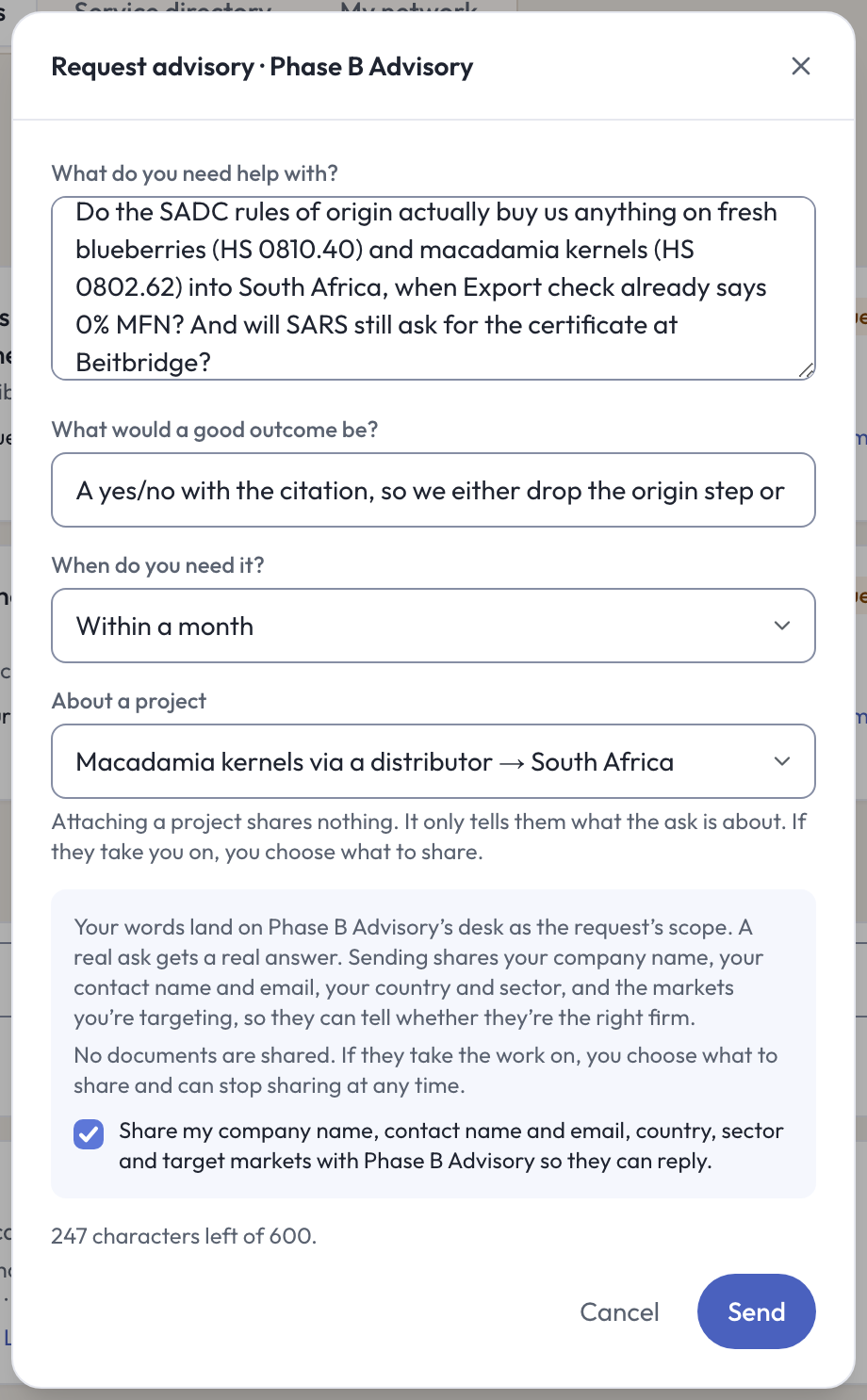
The sheet asks four things, and they are separate on purpose:
- What do you need help with. Mashonaland Highlands asked whether SADC rules of origin actually buy anything on HS 0810.40 and HS 0802.62 into South Africa when the standard rate is already 0 percent, and whether the South African revenue service will still ask for the certificate at Beitbridge.
- What would a good outcome be. “A yes or no with the citation, so we either drop the origin step or keep it.”
- When do you need it.
- Which project it is about. Attaching a project shares nothing — it only tells them what the ask is about.
Then the sharing, stated in full before you send: your company name, your contact name and email, your country and sector, and the markets you are targeting travel with the request, so the firm can tell whether it is the right firm. No documents are shared. If they take the work on, you choose what to share and can stop sharing at any time. There is a tick box for it, and Send stays disabled until you tick it.
There is a 600-character limit with a live countdown, so nothing you write gets silently cut. Sent requests appear under Your advisory with the firm, the project, the stage and the next step.
Recommended
Firms already on the platform, ranked against your company, your markets and your products. Save the ones worth keeping, dismiss the ones that are not, and both stick.
The ranking is strict. It is normal to see a small number of strong matches and a longer list filed under Closest available, described as not fully matching your corridor. If the empty state suggests adding markets and products when you already have them, that is the strict threshold talking — open Closest available underneath and judge the firms yourself.
My network
The organizations you already deal with, kept by you: a buyer, a border agent, a bank. Add one and the page checks for duplicates before it writes. Each entry carries a relationship stage you move along (Mashonaland Highlands moved a Johannesburg produce buyer to In conversation), private notes, and a check against sanctions and denied-party lists you can run from the page.
My network and Leads are different drawers, and the page says so: a counterpart you saved from a search is filed under Leads, and on the market or project you filed it to, not here.
Who sees what, and when
This is the part people get wrong, so read it once.
- When someone asks to be introduced to you, nothing of yours moves until you accept. They see what your sharing switches allow — your profile, products, markets, and the title, summary and stage of a project you shared. Your contact details, your documents and the inside of a project stay private.
- When you ask first — a message, an introduction request, an advisory request — your own card travels with it: your company name, your contact name and email, your country and sector, and your target markets. The screen names this before you send. That is how the other side can tell whether they are the right firm.
- When an introduction is accepted, contact is released to both sides and the thread opens. Mashonaland Highlands sent four introduction requests and one was accepted, which released the firm’s contact.
- Threads are two-party. Each conversation says Only the two of you can read it above it, and Goes to [the firm]. Nobody else can read it under the box.
Every choice is written down. Settings → Data & account reads your consent record back to you with a timestamp and the wording version you agreed under. Withdrawing adds a line; it never erases one.
Opportunities
Opportunities, under Discover, lists tenders, forums and investment calls posted by trade bodies. You can save one and express interest. The cards are honest about age: a stale one reads Posted over a year ago and not confirmed since and Still open? Unconfirmed. Believe those labels and check the source before you spend a week on one.
In the console
Each of these pages carries an (i) beside its title. This is what it says, and where it sends you next.
- Opportunities
Programs you can find, save and express interest in.
- Opportunity
One program, what it asks for, and how old the posting is.
- Recommended
Service providers and companies ranked for your business.
- Leads
Search for possible buyers, distributors and partners in a target market.
- Advisors
The advisory work you have under way, and every firm listed.
- Advisory firm
One advisory firm: what it does, where it works, and how to ask it something.
- Assignment
One advisory assignment: the firm, the stage and what happens next.
- Service directory
Listed firms, from freight to finance: a registration, not a check we ran.
- Listing
One firm: what it does, how it ranks against your corridor, and three ways to reach it.
- My network
Who you already work with, and how to ask them for help.
- Partner
One organization you deal with: the stage, your notes and the checks you ran.
What to do next
- Run one Leads search, on your strongest product, into your best market. Then call one of them.
- Line up the operational firm you will need before the shipment, from the Service directory.
- Read Introductions & consent if you want the full detail on sharing.
- Then fund the trade: Trade finance.