How to sell on international marketplaces
Sell to buyers abroad through online marketplaces, with the platform’s audience, payments and often fulfillment.
For a company with consumer or small-business goods that ship in parcels, which wants to test demand in several countries without appointing a partner in each.
On this page: In short
In short
In short
To sell on international marketplaces, check that your product may be sold in the markets you want, choose platforms that accept sellers from your country, decide how orders will be fulfilled, and price each listing with the platform’s fees, shipping, duty, import VAT and returns built in1,2,3. The rules for low-value parcels changed quickly in 2025 and 2026 in the United States, the European Union and the UK, so check the current rules for each market before you set a price4,5,6. Once orders flow, match every payout to the orders, fees and refunds behind it.
The route in Promote:Global
Online marketplace · Export-based
Commitment
Control
Risk
Rated 1 to 5, as the iPhone app rates every route when you choose one. The ratings are general, for the route itself: your own commitment, control and risk depend on your market, your product and your partners. Grows into: distributor.
When it fits
Is an online marketplace the right route?
A good fit when
- Your goods ship in parcels, are not heavily regulated, and carry enough margin for platform fees, shipping and returns.
- You want to test demand in several countries without appointing partners, using a marketplace’s audience and fulfillment2,3.
- You can write listings in the local language, price in the local currency and meet local product standards2.
A poor fit when
- The goods are bulky, fragile, regulated or low-margin, and shipping, duty and returns would eat the margin.
- Your product needs a responsible business in the European Union and you cannot name one, or cannot meet the local product rules7.
- Buyers need local service and stock from a partner on the ground. A distributor may suit you better.
The people involved
Who’s involved and how they work together
- Your company to Marketplace: Listings and stock
- Marketplace to Buyers abroad: Delivery, service, returns
- Buyers abroad to Marketplace: Payment at checkout
- Marketplace to Your company: Sales, less platform fees
Step by step
How to sell on international marketplaces, in 10 steps.
Each step says how companies do it, with sources, then what Promote:Global does there, or that the step is yours to do.
Discover
Step 1: Choose the markets, and check the product may be sold there
Before you choose by demand alone, check the duty, any import restriction, and the labeling and safety rules in each market. For trade with the European Union, the European Commission’s Access2Markets covers tariffs, taxes and product requirements1. Note whether the market requires a local business to be responsible for your product, as the European Union does for most consumer goods7.
What this step produces
- A shortlist of markets, with the rules each one sets
Common mistake: Choosing markets by demand alone, then finding that the product needs a certificate or a local responsible business.
With Promote:Global
The Demand explorer ranks countries by how much of your product they import and how fast that is growing, with the year of every figure, for 1 AI action. Export check then gives the duty in a market, standard and preferential, the documents a shipment needs and the checks to make before it ships. Export check is free, and it is guidance, not a customs ruling.
Prepare
Step 2: Meet the product, labeling and safety rules
In the European Union, the General Product Safety Regulation, which has applied since December 2024, requires most consumer products to have a responsible business established in the Union, such as the manufacturer, the importer or an authorized representative, whose details must appear on the product or its packaging and in the online listing7. Check the regulation’s current text for your product. Other rules cover electrical goods, chemicals, cosmetics, labeling and packaging1.
What this step produces
- A compliance file per product and market
- The details of your responsible business in the European Union, where needed
Common mistake: Relying on the marketplace to check compliance, when the seller stays responsible7.
With Promote:Global
A project holds your certificates and documents with their status and expiry, and an expired one blocks the project until it is renewed. Find service providers lists certification and inspection firms that list themselves. Promote:Global does not act as your responsible business in the European Union or confirm that a product complies.
Connect
Step 3: Choose your channels, and check each platform will accept you
Canada’s trade commissioner service counts more than 400 e-marketplaces worldwide. A marketplace brings buyers, brand awareness and sales data; your own site lets you shape the content, the language and the currency, and keeps the customer relationship with you2.
Large platforms run regional or country accounts: Amazon, for example, lists separate accounts for North America and Brazil, for Europe, and for several countries in Asia-Pacific and in the Middle East and North Africa3. Regional platforms set their own entry rules. When this guide was written, Jumia’s cross-border program worked through an overseas warehouse model, selling directly in six African countries, with a separate local application for Egypt9. Before you apply, read each platform’s seller rules: the countries it accepts sellers from, the documents it asks for, and any extra requirements for your product category.
What this step produces
- A channel plan
- Each platform’s seller requirements
Common mistake: Signing up on a platform without checking that it accepts sellers from your country.
With Promote:Global
On a marketplace project, Search for possible buyers looks on the open web for online marketplaces and retail platforms in your category in the market, ranked by fit to your product and route, for 1 AI action. Each result says where it was found. Read each platform’s own seller rules before you apply.
Prepare
Step 4: Apply for the seller account, and get it approved
Platforms ask for business registration, identification, bank or payment details and, for some markets, tax registrations. Jumia, for example, asks for a business license, the legal representative’s identity document and an email address for most of its sites, and more local documents for Egypt9. Allow for the platform to review the application before you can list.
What this step produces
- Business registration
- Identity documents
- A bank or payment account
- Tax registrations, where required
- An approved seller account
Common mistake: Using shortcuts, such as a borrowed bank account or another company’s registration, which platforms and regulators can shut down.
You do this step yourself
Promote:Global does not open marketplace seller accounts. You apply to each platform yourself, on its own terms.
Prepare
Step 5: Work out import VAT, duty and who pays at the border
In the United States, duty-free entry for shipments worth $800 or less has been suspended since 2025. Interim final rules from US Customs and Border Protection in June 2026 cover every mode of entry, the post included, which now has its own informal entry process, and a law-firm note of October 2026 reports that the compliance date for some postal requirements moved to 20 January 20274,10.
In the European Union, the customs duty exemption for consignments worth €150 or less ended on 1 July 2026. A temporary customs duty of €3 per line item applies instead, running to July 2028 according to KPMG’s September 2026 note, and an EU-wide handling fee, a fixed amount set by the Commission, is due to start in November 20265,11. For VAT, the optional Import One Stop Shop lets you charge the buyer’s VAT at checkout on consignments of €150 or less and pay it in one monthly return. A seller from outside the Union needs an EU intermediary to use it, and without it the buyer pays the VAT and any duty on delivery11.
In the UK, the relief from customs duty on goods worth £135 or less is to be removed by October 2028, under an HMRC policy paper of 13 July 2026 summarized by Baker McKenzie. VAT is collected at the point of sale for now, and the details remain open6.
What this step produces
- A landed-cost calculation per market
- An IOSS registration and intermediary, where used
- A decision on who acts as importer
Common mistake: Promising no extra charges on delivery without registering for the Import One Stop Shop or its equivalent, so the buyer is billed at the door and refuses the parcel11.
You do this step yourself
Promote:Global does not register you for the Import One Stop Shop or any other tax scheme, and does not act as your importer. Export check gives a market’s standard and preferential tariff rates; the rules for low-value parcels are separate, so confirm them with the customs and tax authorities and with the marketplace before you set a price.
Prepare
Step 6: Decide how orders will be fulfilled
You can ship each order yourself from home, send stock in bulk to the platform’s or another firm’s warehouse in or near the market, or ship stock to a local warehouse yourself, as Jumia’s overseas warehouse model requires3,9. Amazon’s fulfillment service, for example, handles shipping, returns and customer service for a fee3. Freight forwarders, customs brokers and fulfillment houses can help2.
What this step produces
- A fulfillment and shipping plan
Common mistake: Shipping each order as a parcel from home when duty and returns make small orders unprofitable.
With Promote:Global
Find service providers lists logistics and freight, customs and compliance, and digital and e-commerce firms that list themselves on Promote:Global; whether one is listed for your market varies. A request to a firm carries your company’s contact card, which you see before it is sent, and the firm answers in Messages.
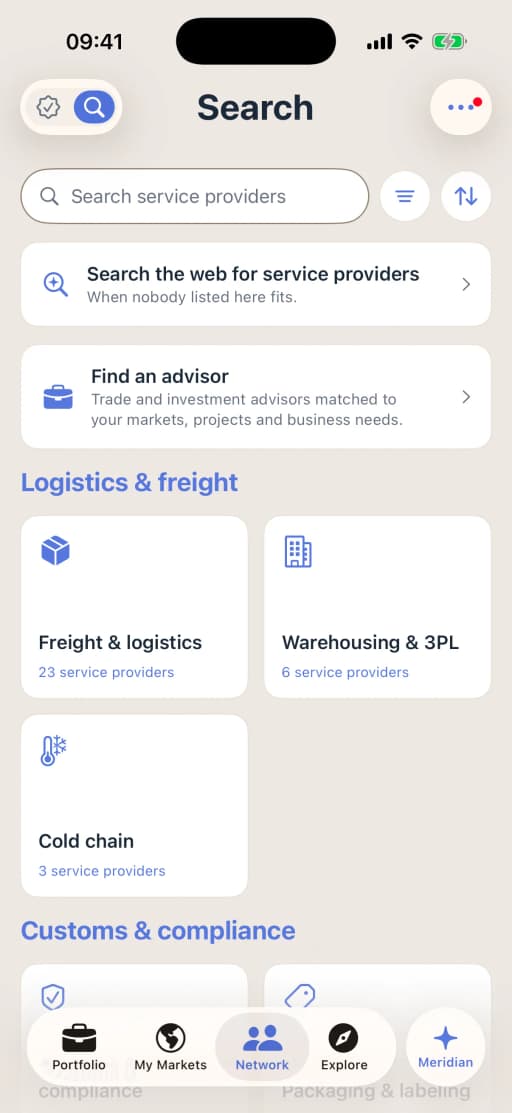
Service providers by category, on iPhone. Prepare
Step 7: Set up customer service and returns
In the European Union, consumers who buy online can withdraw within 14 days without giving a reason, and goods carry a legal guarantee of at least two years against faults8. Other countries set their own rules. Decide whether returns go to a local address, are disposed of, or come back to you, and who pays for them, and publish the policy with your listings2.
What this step produces
- A returns policy in the local language
- A return address or partner
Common mistake: Offering no local returns option, so buyers wait weeks and leave poor reviews.
You do this step yourself
Customer service and returns are yours, or your platform’s and fulfillment partner’s. Promote:Global does not handle orders, returns or messages from your buyers.
Prepare
Step 8: List your products and set the prices
Write listings in the local language, show prices, shipping and tax in the local currency, publish your shipping and returns policies, and take payment before you ship, through a card processor or a payment service2. Make only the claims you can support, and show a certification mark only where its owner has licensed you to use it.
Price each product from the margin on one order, with the platform’s fees in it. Amazon’s global selling page, for example, describes a monthly fee for its professional plan, referral fees that vary by category, and optional charges for fulfillment and advertising3. The example under What to budget for, below, works one order through.
What this step produces
- Listings in the local language
- A price list per market
- A margin per order, per product and platform
Common mistake: Pricing from your home costs without adding the platform’s fees, shipping, duty and returns.
With Promote:Global
Landed cost adds goods value, freight, insurance, duty, tax and fees, and shows the cash needed at import, each line marked as your figure, an estimate or a live lookup, so the platform’s fees can go in as your own figures. It is free. On the plan, tick Choose a marketplace and list your product for your target market once the listings are live.
Grow
Step 9: Ship the first stock, go live, and reconcile every payout
Start with one or two markets and a few products. Where a warehouse fulfills the orders, your first shipment is the stock, sent in bulk with its commercial invoice and packing list. Check customers and delivery addresses, and do not ship where you cannot identify the customer or the country the order comes from2.
A payout from a platform is your sales less its fees, refunds and the other charges it deducts. Match each one to the orders, the platform’s fee statement and the deposit in your bank, including the currency conversion, and chase any difference while the period is still open.
What this step produces
- The first stock shipment’s invoice and packing list
- A reconciliation of each payout
Common mistake: Counting a payout as sales, so the fees and refunds it nets off never reach the margin report.
You do this step yourself
Promote:Global does not connect to marketplaces, ship orders or read payouts: you reconcile them yourself, or with your accountant. Where you ship stock to a warehouse, the plan’s shipment steps fit that first shipment.
Grow
Step 10: Measure the margin, keep up with the rules, then expand
Track sales, fees, shipping, duty, returns and reviews every month, as a margin per order and per market, and add a market only once the first one is profitable. Duty, VAT, platform fees and product-safety rules are all changing: give someone the job of checking them each quarter for your main markets, and follow the customs and tax authorities’ own pages4,5,6.
What this step produces
- A monthly margin report per market
- A quarterly compliance check
Common mistake: Pricing on last year’s low-value parcel or VAT rules.
With Promote:Global
The Revenue tracker adds up the revenue you log, by market and by project, against the goal you set for each market; the figures are the ones you enter. Promote:Global does not track marketplace fees or low-value import rules for you: check them with the platforms and with each market’s customs and tax authorities.
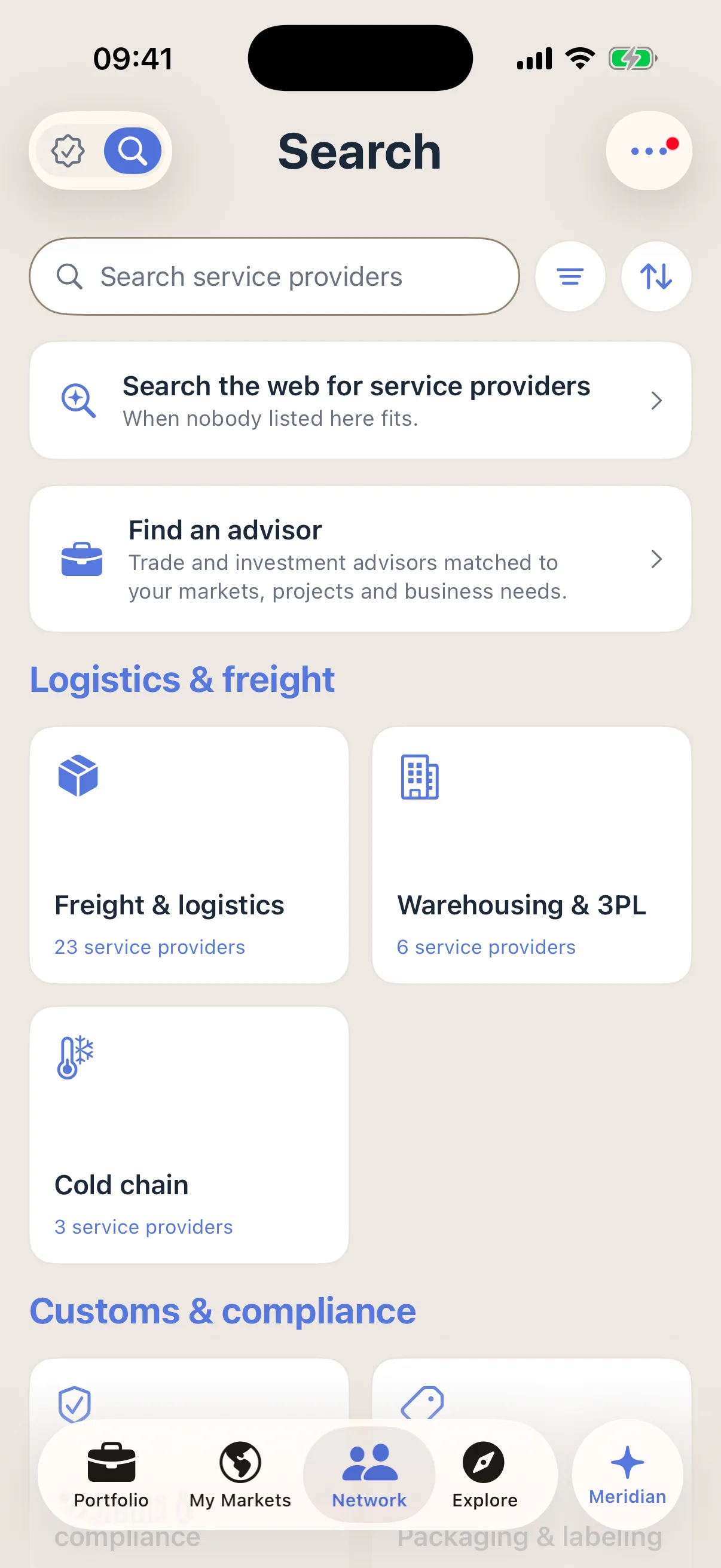
Your plan in Promote:Global
What an online marketplace project looks like.
Create a project, choose “Online marketplace” under “How are you entering?”, and Promote:Global writes this plan for your product and market. The route is in the list on the web and on iPhone. You tick steps off, skip one for now or add your own.
Research
- Validate demand for your product in your target market
- Classify your product for customs (until the HS code is confirmed)
Compliance
- Confirm duty and landed cost into your target market
- Prove your product originates in your country (where a trade agreement offers a lower rate)
- Obtain a certificate (one for each certificate the route needs)
- Meet product, labeling and packaging rules for your target market
Outreach
- Choose a marketplace and list your product for your target market
Commercial
- Agree the Incoterm, price and payment terms with your buyer in your target market
Shipment
- Assemble the export document pack
- Book freight to your target market
- Ship a first order to your target market
Post-shipment
- Present the documents and collect payment from your target market (when paid by letter of credit or collection)
- Debrief the first shipment and fix the pack
The duty, origin and certificate steps are looked up from your product’s HS code and the two countries, so their number depends on what you sell and where. A step with a condition in brackets appears only where it applies. In your own project, each step names your product and your countries. Building the plan uses no AI action.
On a project, Search for possible buyers looks on the open web for online marketplaces and retail platforms in the category, or for whoever you describe, ranked by fit, for 1 AI action. A result is a lead to check before you contact anyone, not a confirmed buyer.
Make the plan fit this route
The plan for this route is the export corridor: after the product rules it has one marketplace step, then a step to agree the price and payment terms with a buyer, and the shipment. On a marketplace the platform sets the terms of sale, so skip “Agree the Incoterm, price and payment terms with your buyer in your target market” for now, read the shipment steps as your first stock shipment to a warehouse, and add these steps in this order.
- Check each platform will accept you as a seller (in Outreach, before “Choose a marketplace and list your product for your target market”)
- Apply for the seller account and get it approved (next)
- Register for import VAT, or decide who pays at the border (next)
- Decide how orders will be fulfilled (next)
- Set up customer service and returns (next, just before “Choose a marketplace and list your product for your target market”, which you tick once the listings are live)
- Reconcile each payout against orders, fees and refunds (after “Ship a first order to your target market”)
- Review the margin per order and per market each month (last, after “Debrief the first shipment and fix the pack”)
On the project, type a step into Add a step under the roadmap, or ask Meridian to propose them: a step Meridian proposes is added only when you accept its card.
Meridian
Meridian, on your online marketplace project.
Meridian, the built-in AI assistant on the web and on iPhone, reads the project you have open: its route, its countries, the steps still open and your notes. It answers questions about them, and it proposes changes as cards. Nothing changes on the project until you accept a card. Ask it to search for possible buyers and it runs the project’s search in the conversation, looking on the open web for online marketplaces and retail platforms in the category, for 1 AI action; every result is a lead to check.
Ask
- What’s the next step on this project?
- What’s blocking this project?
- What should we compare between marketplaces?
Do
Add a step — to this plan, as a card you accept
Save a note — to the project
Set entry method — one of the eighteen routes, with its reason, if another fits you better
Every plan carries a monthly allowance of AI actions, and each question uses 1. Building the plan uses none, and neither do Export check, Landed cost and the Origin qualifier. Meridian is AI. Verify before acting.
Documents
The paperwork.
- Seller account documents
- Business registration, identification, and a bank or payment account9.
- Product compliance file
- Test reports, labeling, declarations of conformity and the details of your responsible business in the European Union7.
- Commercial invoice and packing list
- For each bulk shipment of stock to a warehouse, with the transport document.
- IOSS registration and intermediary agreement
- For sellers outside the European Union that charge VAT at checkout on low-value consignments11.
- Customs entry data
- Classification, origin and value, for formal or informal entry into the United States10.
- Marketplace seller agreement and fee schedule
- The platform’s own terms, which it can change3.
- Payout reconciliations
- Each payout matched to its orders, fees, refunds and the deposit in your bank.
Costs and timelines
What to budget for.
Get quotes for
- One order, worked through
- Made-up round figures, to show the arithmetic only: a sale at €30.00, of which €5.00 is VAT; less the platform’s referral fee, €4.50, and its fulfillment fee, €3.50; less the landed cost of the unit, €10.00 (the goods, the freight to the warehouse and the duty); less €1.00 set aside for returns and €1.00 for advertising. That leaves €5.00 on the order. Put the platform’s own fee schedule and your own costs in each line3.
- Platform fees
- A plan fee, referral fees by category, and charges for fulfillment and advertising, on Amazon’s description. Moves with the platform, the country and the category3.
- Shipping the stock to the market
- Freight, duty and import VAT on each bulk shipment to a warehouse. Moves with the mode, the volume and the market.
- Duty on low-value parcels
- In the European Union, €3 per line item on consignments of €150 or less since 1 July 2026, and a handling fee from November 2026 at an amount the Commission sets5,11.
- Representatives in the European Union
- An intermediary to use the Import One Stop Shop, and a responsible business for products that need one. Moves with the provider and the number of products7,11.
- Returns
- Return shipping, refunds and disposal. Moves with the category, the market and its consumer rules8.
What sets the timing
- Product compliance first, since the responsible business’s details must be on the product and in the listing7.
- Seller eligibility and the platform’s review of your account, platform by platform9.
- Tax registrations, such as an Import One Stop Shop intermediary, before you charge VAT at checkout11.
- The first stock shipment to a fulfillment warehouse, where you use one, before the listings can sell.
- Dates already set: the US compliance date for some postal requirements, 20 January 202710; the end of the UK’s £135 relief, by October 20286.
Ask for each quote in writing, for your product, market and volumes. Prices and timings differ by country, provider and year.
Mistakes and best practices
What goes wrong, and what works.
Common mistakes
- Leaving slow-selling stock in a fulfillment warehouse without checking what its storage costs.
Best practices
- Keep the margin on one order for each product and platform, and update it whenever a fee schedule changes.
Questions
Questions people ask.
Which marketplace should I sell on first?
Choose by your product, your buyers and the country, and check that the platform accepts sellers from your country2,3,9.
What happened to the US de minimis exemption?
Duty-free entry for shipments of $800 or less was suspended in 2025, and rules from US Customs and Border Protection in June 2026 cover every mode of entry, the post included4,10.
What is the EU €3 duty, and what is IOSS?
Since 1 July 2026, consignments worth €150 or less pay a temporary customs duty of €3 per line item. The Import One Stop Shop is a separate, optional VAT scheme: you charge the buyer’s VAT at checkout and pay it in one monthly return5,11.
Do I need a representative in the European Union to sell online there?
For most consumer products, a business established in the Union must be responsible for the product’s safety, and a seller from outside the Union that uses the Import One Stop Shop needs an EU intermediary7,11.
Can customers return products bought online?
In the European Union, consumers can withdraw from an online purchase within 14 days without giving a reason8. Other countries differ, so check each market.
Sources
Where this guide comes from.
- [1]About Access2Markets · European Commission, Directorate-General for Trade
- [2]Step 10: E-commerce · Trade Commissioner Service, Government of Canada
- [3]Sell globally · Amazon, the marketplace’s own seller page, read October 2026
- [4]CBP suspends de minimis for mail shipments and new postal entry process · Thomson Reuters ONESOURCE, 2026
- [5]EU customs reform enters into force with new e-commerce rules · KPMG, 2026
- [6]UK low value import relief to be removed by October 2028 · Baker McKenzie, law firm, 2026
- [7]Regulation (EU) 2023/988 on general product safety · European Union, EUR-Lex, 2023
- [8]Consumer guarantees, warranties, claims and returns · Your Europe, European Union
- [9]How to apply for an overseas warehouse shop · Jumia vendor center, the marketplace’s own page
- [10]CBP delays implementation date of de minimis exemption for mail shipments · Thompson Hine, law firm, 2026
- [11]Import One Stop Shop (IOSS) · Irish Revenue Commissioners
Reviewed October 26, 2026. This guide is general information about how companies do this, written in our own words from the sources above; it is not legal, tax or financial advice. Rules differ by country and change, so check them with the authority or an advisor before you act. What it says Promote:Global does is what the product does today. The screens on this page come from our demo workspace, and the companies in them are invented.
Read next
Related guides.
The next rung up
How to find a distributor abroadDistributor · Export-based
- How to export goods
Direct exporting · Export-based
- How to find a sales agent abroad
Sales agent · Export-based
- How to export through a trading company
Indirect exporting · Export-based
All eighteen guides Promote:Global for exporters Plans and prices
Start your online marketplace project.
Sign up, add what you sell, then create a project and choose “Online marketplace” under “How are you entering?”. The plan above is written for your product and market.
Start this projectFree to start. No credit card needed. See plans and prices