How to export goods
Sell goods straight to a customer abroad and run the export yourself: market, duty, price, payment, documents, shipping.
For a company that makes or sells goods, already sells reliably at home, has capacity to spare, and wants to sell straight to customers abroad and run the export itself, from the first quote to getting paid. This guide covers goods: a service crosses no customs border, so its duty, document and shipping steps do not apply to one.
On this page: In short
In short
In short
To export goods, write a short plan and choose one market on evidence, confirm your product’s HS code, and check the duty, the rules of origin and whether the goods need an export license1,2,3,4. Then quote a price with an Incoterm and its named place, agree how you will be paid, and ship with one consistent set of documents, usually through a freight forwarder5,6,7. Selling direct keeps the customer, the price and the margin with you, and the paperwork and credit risk too.
The route in Promote:Global
Direct exporting · Export-based
Commitment
Control
Risk
Rated 1 to 5, as the iPhone app rates every route when you choose one. The ratings are general, for the route itself: your own commitment, control and risk depend on your market, your product and your partners. Grows into: wholly-owned subsidiary.
When it fits
Is direct exporting the right route?
A good fit when
- You already sell reliably at home, have capacity to spare, and someone on staff can own the export paperwork and the conversation with buyers.
- Buyers in the market can be reached online, at trade events or through referrals, and orders are large enough to carry the paperwork each shipment needs.
- You want to keep the price, the brand and the customer relationship, rather than share margin with an intermediary.
A poor fit when
- The product needs installation, local stock or heavy after-sales service in the market. A distributor or a presence of your own usually suits that better.
- The buyer is unknown and wants open account terms, and you cannot check or insure the risk6,8.
- The goods or the destination may need an export license, and nobody on staff can handle the compliance4.
The people involved
Who’s involved and how they work together
- Your company to Freight forwarder: Goods and export documents
- Freight forwarder to Buyer abroad: Goods to the named place
- Freight forwarder to Your company: Bill of lading or air waybill
- Buyer abroad to Your company: Payment on agreed terms
Step by step
How to export goods, in 10 steps.
Each step says how companies do it, with sources, then what Promote:Global does there, or that the step is yours to do.
Discover
Step 1: Write a short export plan and choose a market
Government export roadmaps start in the same place: check that your capacity, cash flow and staff can carry export orders, then write a short plan with goals, a budget, a timeline and the markets you will try first1.
Compare a few markets on evidence before you pick one: demand and how fast it is growing, competitors, the tariff, product standards and how the goods would travel. Free official tools help. The Rules of Origin Facilitator, run by ITC with the World Customs Organization and the World Trade Organization, draws its tariffs from ITC’s Market Access Map, and the European Commission’s Access2Markets covers tariffs, origin, procedures and product requirements for trade with the European Union3,9. Start with one or two markets and one product line.
What this step produces
- A one-page export plan
- A shortlist of one to three markets
Common mistake: Letting the first inquiry from abroad choose the market, instead of comparing two or three.
With Promote:Global
The Demand explorer ranks countries by how much of your product they import, how fast that is growing and how hard the market is to enter, from UN Comtrade and WITS data, with the year of every figure, for 1 AI action. A market’s page adds the economy and the investment climate from World Bank indicators, and Export readiness counts the requirements you have already done, from your own records.
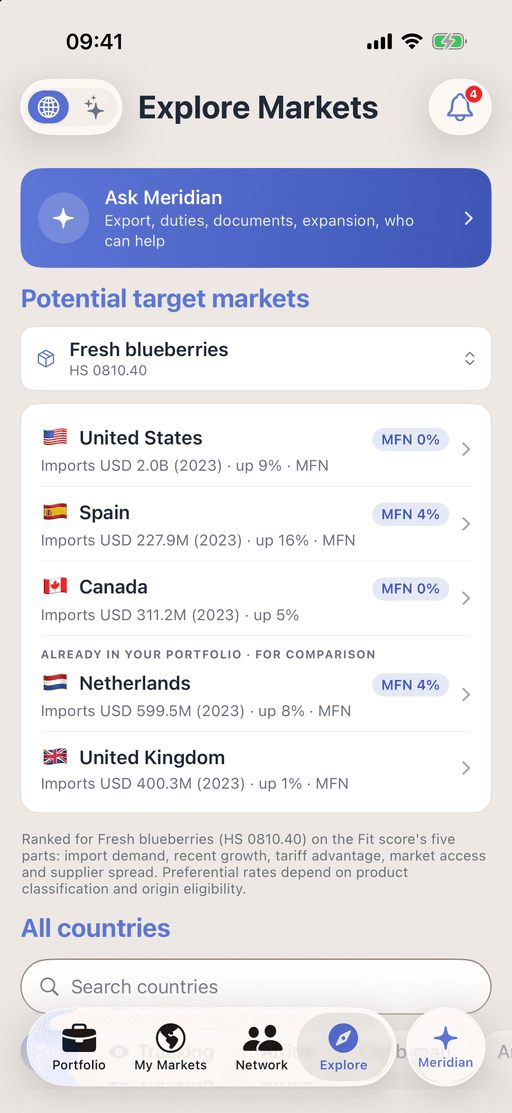
Markets ranked for one product, on iPhone. Prepare
Step 2: Classify your product with its HS code
The Harmonized System, run by the World Customs Organization, gives every product a six-digit code shared by more than 200 countries. Each country adds digits of its own for its tariff, so the full code can differ between your country and the market2. Find the six-digit code first, then the destination’s own tariff line.
Where you are unsure, ask a customs broker or the customs authority. Some authorities issue a binding ruling on how a product is classified, which is worth having for high-value or repeat goods9.
What this step produces
- The six-digit HS code
- The destination’s tariff line
Common mistake: Letting a courier or a forwarder guess the code, or assuming the digits after the first six are the same in both countries2.
With Promote:Global
Each product you add holds its HS code, and the code is yours to confirm. If you do not know it, the Demand explorer can find a code from a description for 2 AI actions. If a product has no code yet, the plan starts with a step to classify it for customs. A suggested code is not a customs ruling.
Prepare
Step 3: Check the duty, the rules of origin and the product rules
Look up the import duty in the market, and whether a trade agreement between the two countries offers a lower rate. The lower rate applies only if your goods meet that agreement’s rule of origin and you can prove it. The Rules of Origin Facilitator shows the product-specific rules, and the documents that prove origin, for more than 350 agreements3.
Check the market’s rules for the product itself as well: labeling, safety, plant and animal health, and certification9.
What this step produces
- The duty rate, standard and preferential
- Proof of origin, where you claim a lower rate
- A list of the product rules to meet
Common mistake: Claiming a preferential rate without the origin evidence to support it3.
With Promote:Global
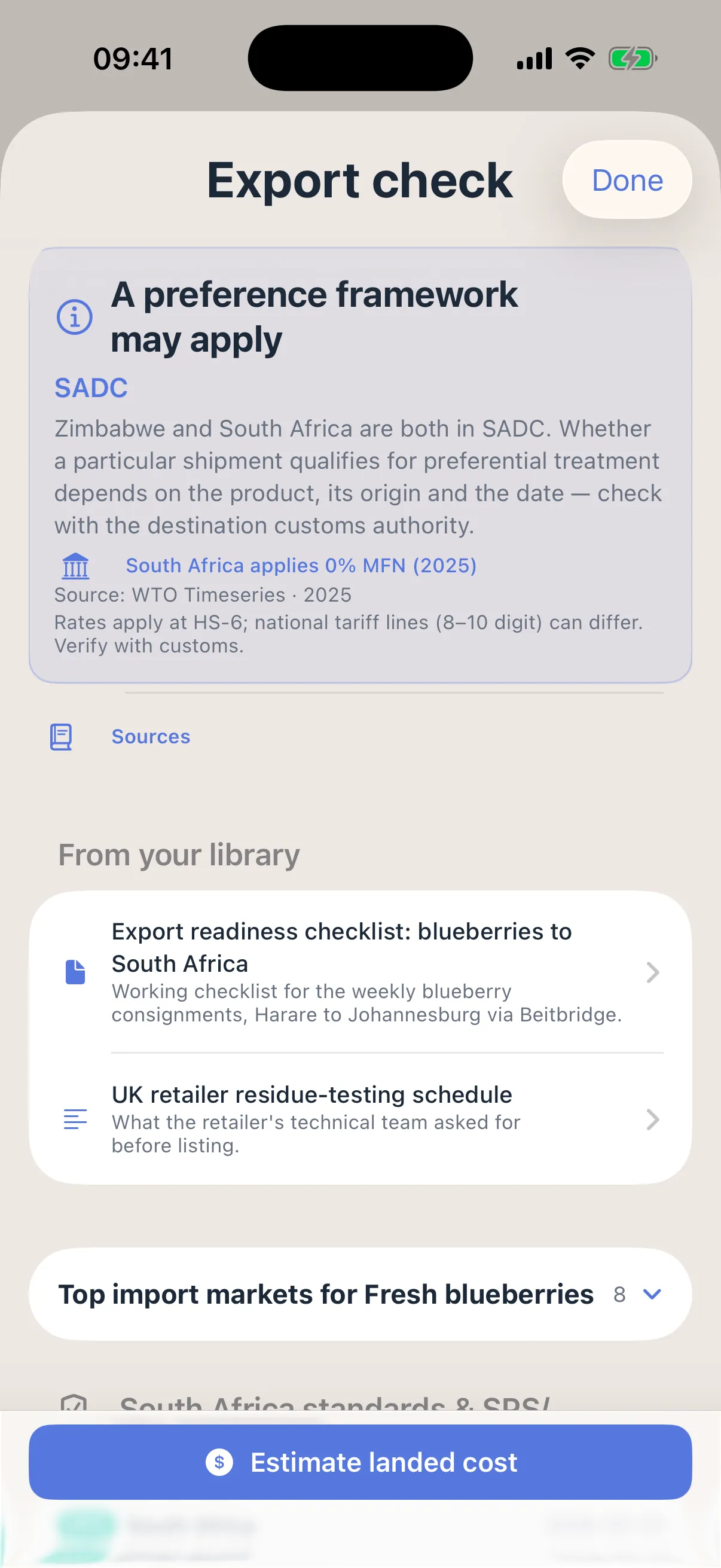
Export check gives the duty your product pays in the market, standard and preferential, with its source and year, the origin status, the documents the shipment needs with who issues each, and the checks to make before it ships. The Origin qualifier then walks the agreement’s origin rule one question at a time and gives a self-assessed verdict. Both are free, and both are guidance, not a customs ruling.
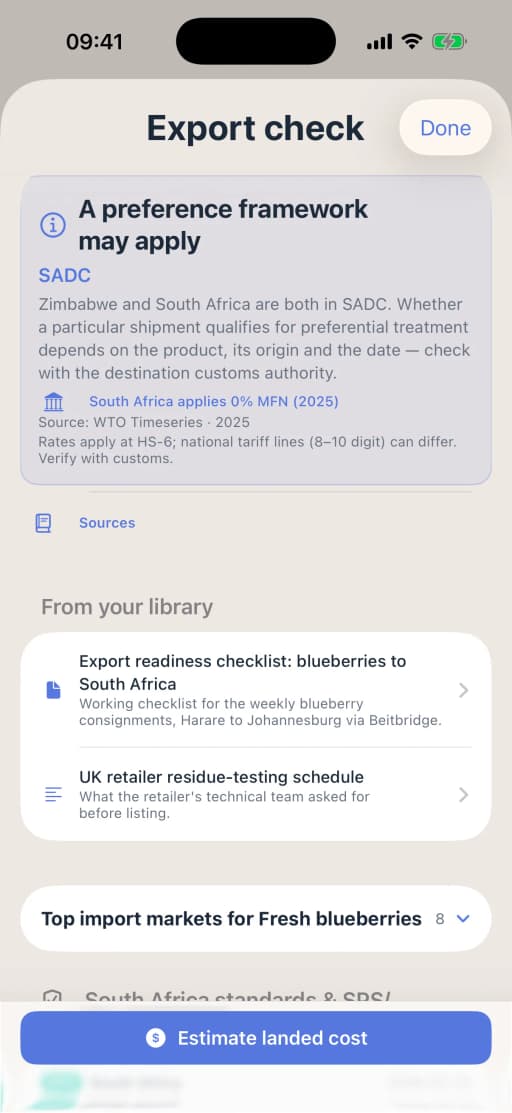
Export check on iPhone, for one product on one route. Prepare
Step 4: Check whether the goods need an export license
Most goods ship without a license. Goods on a control list, such as military and dual-use items, and sales to sanctioned destinations or end users need a license or another authorization, and checking is the exporter’s job. In the European Union, dual-use exports fall under Regulation (EU) 2021/821, which sets out the kinds of authorization available4. Other countries keep their own control lists, so check the one that applies to you.
Check the buyer, the end user and the end use as well as the product. Keep a record of why no license was needed, and where one is, apply well before the goods are due to ship.
What this step produces
- An export license or authorization, where needed
- A record of why none was needed
Common mistake: Checking the product against the control list but not the end user or what the goods will be used for.
You do this step yourself
Promote:Global does not decide whether your goods need an export license and does not apply for one. Check your country’s control list and sanctions rules yourself, and apply to the authority that issues licenses. The plan has no step for this, so add one (see Make the plan fit this route, below).
Connect
Step 5: Identify buyers, and check them before you give credit
Exporters meet buyers at trade shows and on trade missions, through their national export agency and their industry association, through referrals and online. Talk to several, ask each about its business and its customers, and quote only once you understand what it needs.
Before you sell on credit, check the buyer: trade and bank references and a credit report. The less you know about a buyer, the more secure the payment method should be6,8.
What this step produces
- A shortlist of buyers
- References and a credit report for any buyer you will give credit
Common mistake: Offering open account terms to a buyer you have not checked6.
With Promote:Global
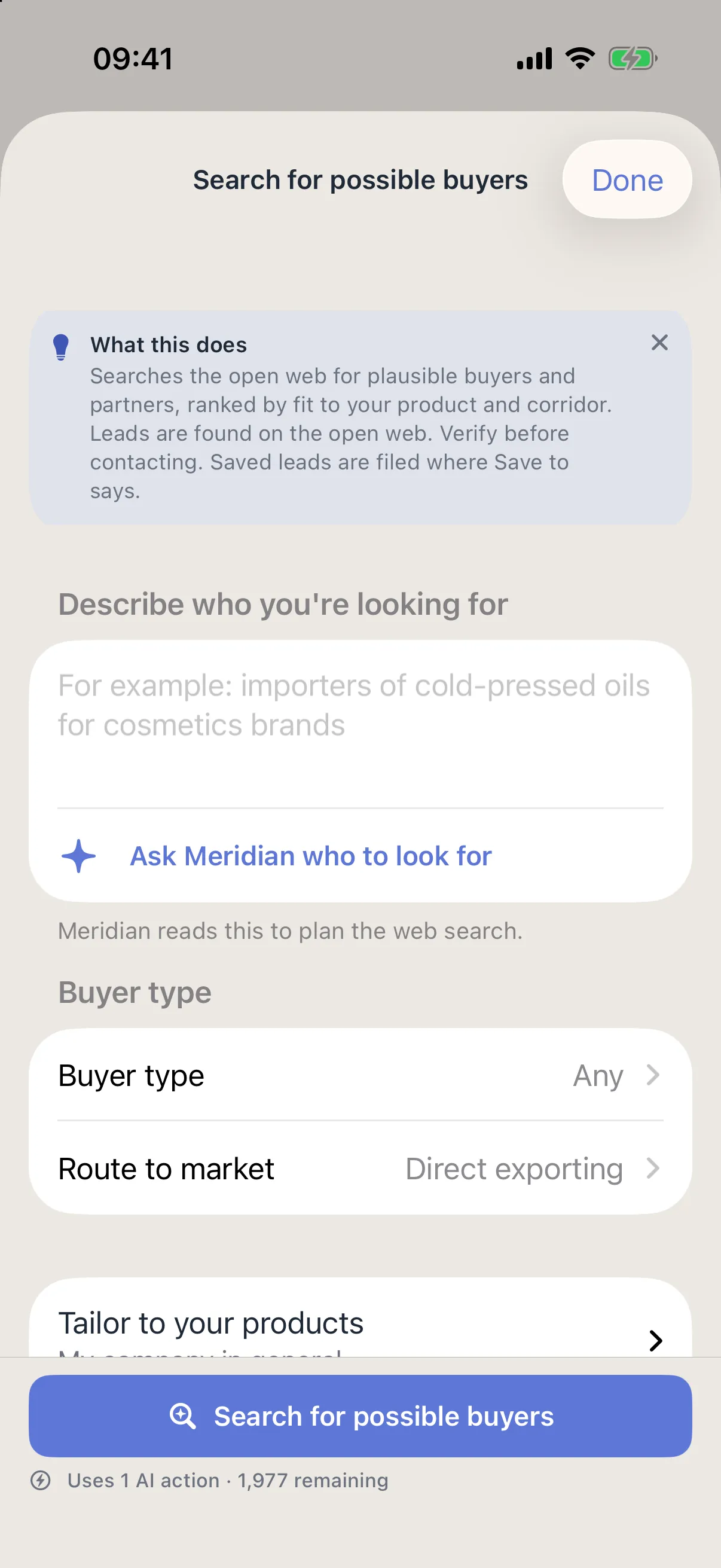
On the project, Search for possible buyers looks on the open web for end buyers and importers of your product in the market, ranked by fit to your product and route, for 1 AI action. You can set the buyer type to importers, distributors, wholesalers, retailers or sales agents. Each result says where it was found and is a lead to check before you make contact, which you can save to the project. If your chamber or trade agency works with you on Promote:Global, you can ask it for an introduction, and the other side decides. Promote:Global does not check anyone’s credit: add the credit check as a step after the buyer step, and do it yourself with your bank or a credit agency.
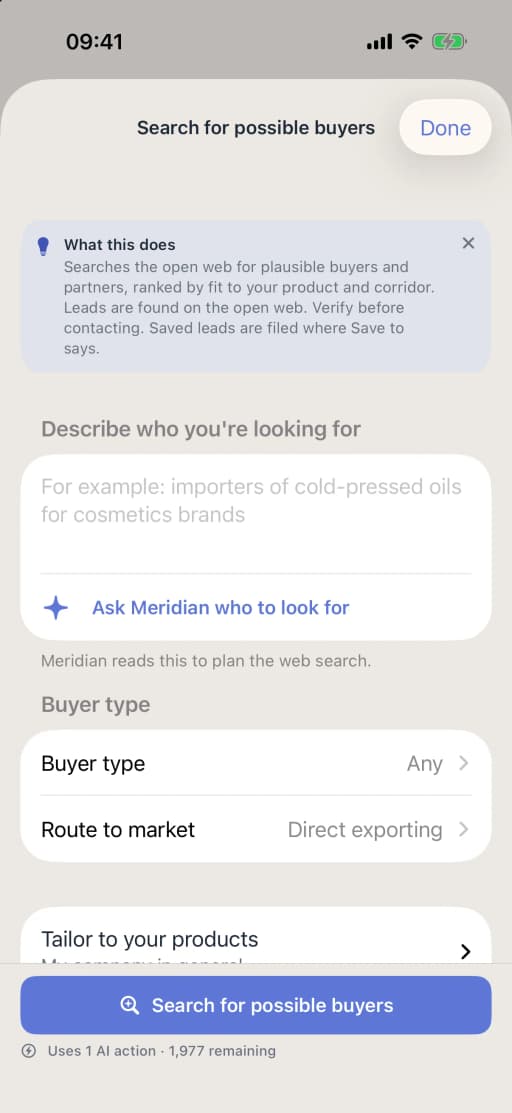
Searching for possible buyers from a direct export project, on iPhone. Prepare
Step 6: Price the sale, and name an Incoterm and its place
Build the quote from the cost of the goods, packing, freight, insurance, duties and your margin, then state where you deliver with an Incoterms rule and a named place. Incoterms 2020, in force since 1 January 2020, is the current edition, and the International Chamber of Commerce’s page shows nothing newer10. It has 11 rules: seven for any mode of transport and four for sea and inland waterway only5.
An Incoterm says who arranges and pays for transport and insurance, who clears customs and where the risk passes to the buyer. It does not set the price, the payment terms, when ownership passes or how disputes are settled, so those go in the sales contract5.
A first shipment, end to end. Say you quote 400 cartons to an importer abroad, CIP its warehouse. Under CIP you pay the carriage to that warehouse and insure the goods on the way, so both go into your price, while the risk passes to the buyer when you hand the goods to the first carrier, and the import clearance is the buyer’s11. The importer then works out its own landed cost: your price plus the duty and taxes it pays at import, which is why it asks for a proforma invoice first. Once it orders, the proforma becomes the commercial invoice, with the same description, quantities and values as the packing list and the transport document7. And the payment terms decide what happens to those documents: with 30 percent in advance and the balance by documentary collection, the bank hands the documents to the buyer only against payment6.
What this step produces
- A quotation or proforma invoice
- A sales contract with the Incoterm and its named place
Common mistake: Using a sea-only rule, such as FOB, for goods that travel by air or road5.
With Promote:Global
Landed cost adds goods value, freight, insurance, duty, tax and fees, and shows the customs value and the cash needed at import, each line marked as your figure, an estimate or a live lookup. On the web, Export check lets you set the transport, the Incoterm and its named place, and how you will be paid. Both are free, and the project’s Confirm duty and landed cost step opens them already filled in.
Prepare
Step 7: Agree how you will be paid, and cover the risk
Four methods are common, from the safest for the exporter to the riskiest: cash in advance, a letter of credit, a documentary collection and open account6. With a letter of credit, a bank undertakes to pay once you present documents that meet its terms, so the documents must match it exactly. With a collection, the banks pass the documents to the buyer against payment or a promise to pay, without a bank’s own undertaking6.
If buyers expect open account terms, export credit insurance covers you against a buyer that cannot or will not pay and against political risk. It usually covers a share of the loss, not all of it8.
What this step produces
- Payment terms in the sales contract
- A letter of credit or collection instructions, where used
- An export credit insurance policy, where used
Common mistake: Presenting documents that differ from the letter of credit in any detail, which lets the bank refuse to pay6.
You do this step yourself
Promote:Global does not check a buyer’s credit, arrange a letter of credit or insure a sale: agree those with your bank and an export credit insurer. Find service providers has banking and insurance and risk categories, where firms list themselves, and the plan adds a step to present the documents and collect payment when you are paid by letter of credit or collection.
Prepare
Step 8: Prepare the export documents
A typical set is a proforma invoice that later becomes the commercial invoice, a packing list, the transport document (a bill of lading for sea, an air waybill for air), a certificate of origin where the buyer or customs needs one, and any license and export declaration7. Customs uses the commercial invoice to assess duty, and it should state the Incoterms rule7,12.
Make every document tell the same story: the same description, quantities, weights, values and parties on each one.
What this step produces
- Commercial invoice and packing list
- Bill of lading or air waybill
- Certificate of origin, where required
Common mistake: Details that differ between the invoice, the packing list and the transport document7.
With Promote:Global
Export documents, on the web, fills a commercial invoice, a proforma invoice or a packing list from the project, to check, print or save to the project. Export check lists the documents the shipment needs, by stage, with who issues each, and Meridian on the project can propose a list of documents for your route as a card, which changes nothing until you approve it.
Grow
Step 9: Choose a forwarder and a customs broker, and book the freight
A freight forwarder books the transport and can handle the documents, the freight rates, cargo insurance and customs clearance; a customs broker is a licensed specialist in classification, duty and customs filings12,13. Neither is required by law in most places, but both are worth their fee on a new route or a large shipment.
Choose on experience with your goods and your destination, not on the freight rate alone. Check whether your country needs an exporter number before the goods can be declared: the UK and the European Union, for example, require an EORI number12.
What this step produces
- A freight booking
- The export declaration
- An exporter number, where required
Common mistake: Choosing a forwarder on the freight rate alone, without asking about its experience on your route.
With Promote:Global
Find service providers lists logistics and freight, and customs and compliance firms that list themselves on Promote:Global; whether one is listed for your market varies. A request to a firm carries your company’s contact card, which you see before it is sent, and the firm answers in Messages. Promote:Global does not book freight or file customs declarations.
Grow
Step 10: Ship, get paid and learn from the first order
Track the shipment, send or present the documents as the payment terms require, and confirm that the buyer has cleared the goods. Keep a file for every shipment, because customs and export control authorities can ask to see the records4.
Then review what went well and what did not, and decide whether to repeat the order, appoint a partner in the market, or add a second market.
What this step produces
- Proof of delivery and of payment
- A records file for the shipment
Common mistake: Treating the first shipment as finished, instead of fixing what it taught you before the second.
With Promote:Global
The plan carries the shipment through to Debrief the first shipment and fix the pack. The Revenue tracker adds up the revenue you log, by market and by project, against the goal you set for each market. Promote:Global does not track shipments or collect payment.
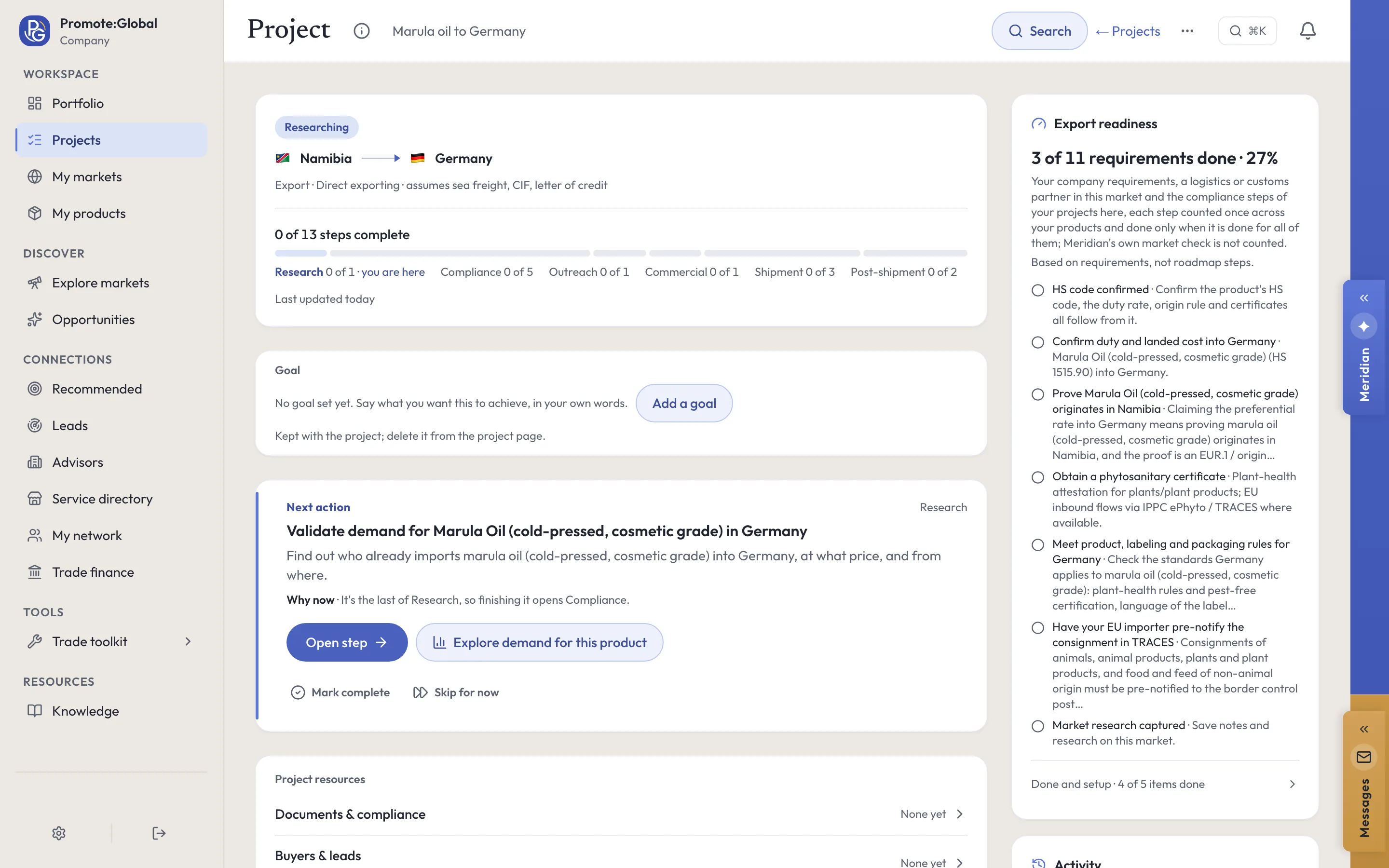
Your plan in Promote:Global
What a direct exporting project looks like.
Create a project, choose “Direct exporting” under “How are you entering?”, and Promote:Global writes this plan for your product and market. The route is in the list on the web and on iPhone. You tick steps off, skip one for now or add your own.
Research
- Validate demand for your product in your target market
- Classify your product for customs (until the HS code is confirmed)
Compliance
- Confirm duty and landed cost into your target market
- Prove your product originates in your country (where a trade agreement offers a lower rate)
- Obtain a certificate (one for each certificate the route needs)
- Meet product, labeling and packaging rules for your target market
Outreach
- Find and shortlist buyers for your product in your target marketButton: Search for possible buyers in this market
Commercial
- Agree the Incoterm, price and payment terms with your buyer in your target market
Shipment
- Assemble the export document pack
- Book freight to your target market
- Ship a first order to your target market
Post-shipment
- Present the documents and collect payment from your target market (when paid by letter of credit or collection)
- Debrief the first shipment and fix the pack
The duty, origin and certificate steps are looked up from your product’s HS code and the two countries, so their number depends on what you sell and where. A step with a condition in brackets appears only where it applies. In your own project, each step names your product and your countries. Building the plan uses no AI action.
On a project, Search for possible buyers looks on the open web for end buyers or importers of the product, or for whoever you describe, ranked by fit, for 1 AI action. A result is a lead to check before you contact anyone, not a confirmed buyer.
Make the plan fit this route
The plan for this route is the export corridor, from validating demand to the debrief after the first shipment, with the duty, origin and certificate steps looked up for your product and route. It has no step for export controls or for checking a buyer before you give credit: add these two where they belong.
- Check whether the goods need an export license (in Compliance, after “Meet product, labeling and packaging rules for your target market”)
- Check the buyer’s references and credit before you give credit terms (in Outreach, after “Find and shortlist buyers for your product in your target market”)
On the project, type a step into Add a step under the roadmap, or ask Meridian to propose them: a step Meridian proposes is added only when you accept its card.
Meridian
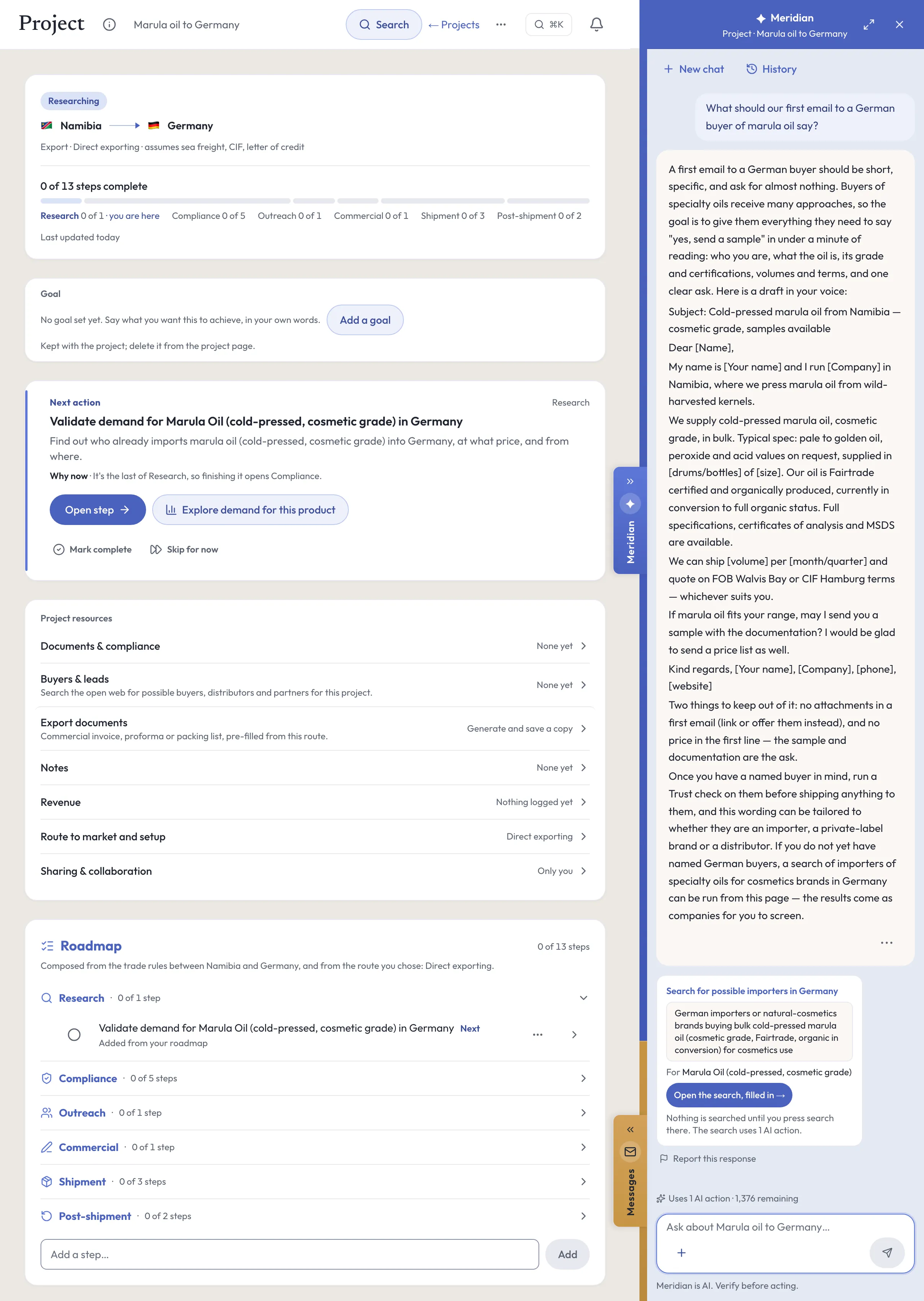
Meridian, on your direct exporting project.
Meridian, the built-in AI assistant on the web and on iPhone, reads the project you have open: its route, its countries, the steps still open and your notes. It answers questions about them, and it proposes changes as cards. Nothing changes on the project until you accept a card. Ask it to search for possible buyers and it runs the project’s search in the conversation, looking on the open web for end buyers or importers of the product, for 1 AI action; every result is a lead to check.
Ask
- What’s the next step on this project?
- What’s blocking this project?
- Which documents will this shipment need?
Do
Add a step — to this plan, as a card you accept
Save a note — to the project
Set entry method — one of the eighteen routes, with its reason, if another fits you better
Every plan carries a monthly allowance of AI actions, and each question uses 1. Building the plan uses none, and neither do Export check, Landed cost and the Origin qualifier. Meridian is AI. Verify before acting.
Documents
The paperwork.
- Export plan
- Goals, markets, budget and timeline, on a page or two1.
- Sales contract
- Price, the Incoterms rule and its named place, payment terms, delivery, governing law and how disputes are settled5.
- Proforma and commercial invoice
- The quote, then the bill that customs uses to assess duty; it states the Incoterms rule7,12.
- Packing list
- What is in each package. It must agree with the invoice7.
- Bill of lading or air waybill
- The contract of carriage and the receipt for the goods7.
- Export license or authorization
- Only where the goods, the destination or the end user are controlled4.
- Export credit insurance policy
- Where you sell on open account and want most of the risk covered8.
Costs and timelines
What to budget for.
Get quotes for
- Freight and cargo insurance
- Moves with the mode, the route, the volume and the Incoterm, which decides whether you or the buyer pays them5,11. Ask two or three forwarders to quote the same shipment.
- Forwarder and customs broker fees
- Moves with the route, the documents they prepare and whether they file the export declaration for you12,13.
- Export credit insurance
- Short-term cover usually pays 90 to 95 percent of a loss, and policies that cover many buyers usually cost under 1 percent of insured sales, according to the US International Trade Administration8. Moves with the buyers, the countries and the terms you give.
- Bank charges on a letter of credit or a collection
- Moves with the amount, the method and the banks involved6.
What sets the timing
- Confirming the HS code, and a binding ruling where you ask the customs authority for one2,9.
- An export license, where one is needed: apply well before the goods are due to ship, since the sources give no standard processing time4.
- Testing or certification the market requires before the goods can be sold there9.
- The payment method: an advance or a letter of credit has to be in place before you ship against it6.
- The mode and the booking: the forwarder’s next sailing or flight on your route.
Ask for each quote in writing, for your product, market and volumes. Prices and timings differ by country, provider and year.
Mistakes and best practices
What goes wrong, and what works.
Common mistakes
- Treating a repeat order as a copy of the first: check the duty, the origin rule and the product rules again when a tariff, an agreement or the product changes3.
Best practices
- Keep one master record of each product’s description, HS code, weights and origin, and fill every document from it.
- Ask your forwarder to check your first document pack before the goods leave.
Questions
Questions people ask.
Do I need a license to export?
Most goods do not. Controlled goods, such as military and dual-use items, and sales to sanctioned destinations or end users do, and the exporter is responsible for checking4.
What is the safest way to get paid for an export?
Cash in advance is safest for you, then a letter of credit, then a documentary collection, with open account the riskiest6.
What documents do I need to export?
Usually a commercial invoice, a packing list and a transport document (a bill of lading or an air waybill), with a certificate of origin where the buyer or customs needs one, and a license or export declaration where they apply7.
What are Incoterms, and which should I use?
Rules from the International Chamber of Commerce that say who arranges transport and insurance, who clears customs and where the risk passes. Choose one that fits how the goods travel, and name the place5,10.
How do I export a service?
This guide covers goods. A service crosses no customs border, so it has no duty, origin or shipping steps; check instead what the market asks of a foreign provider, and how your fee is taxed there.
Sources
Where this guide comes from.
- [1]Learn how to export · U.S. International Trade Administration
- [2]Overview: Harmonized System codes · U.S. International Trade Administration
- [3]About the Rules of Origin Facilitator · ITC, with the World Customs Organization and the World Trade Organization
- [4]Exporting dual-use items · European Commission
- [5]Know your Incoterms · U.S. International Trade Administration
- [6]Methods of payment · U.S. International Trade Administration
- [7]Common export documents · U.S. International Trade Administration
- [8]Export credit insurance · U.S. International Trade Administration
- [9]About Access2Markets · European Commission, Directorate-General for Trade
- [10]Incoterms rules · International Chamber of Commerce, Incoterms 2020
- [11]CIF and CIP Incoterms 2020 explained: key differences · ICC Academy, International Chamber of Commerce, 2024
- [12]Logistics procedures · UK Department for Business and Trade
- [13]Common terms used in international trade · Export Development Canada
Reviewed October 26, 2026. This guide is general information about how companies do this, written in our own words from the sources above; it is not legal, tax or financial advice. Rules differ by country and change, so check them with the authority or an advisor before you act. What it says Promote:Global does is what the product does today. The screens on this page come from our demo workspace, and the companies in them are invented.
Read next
Related guides.
The next rung up
How to set up a subsidiary abroadWholly-owned subsidiary · Investment / FDI
- How to find a distributor abroad
Distributor · Export-based
- How to find a sales agent abroad
Sales agent · Export-based
- How to sell on international marketplaces
Online marketplace · Export-based
- How to export through a trading company
Indirect exporting · Export-based
All eighteen guides Promote:Global for exporters Plans and prices
Start your direct exporting project.
Sign up, add what you sell, then create a project and choose “Direct exporting” under “How are you entering?”. The plan above is written for your product and market.
Start this projectFree to start. No credit card needed. See plans and prices