
For companies
You are the demand side: a company trying to sell into a new country, or set up in one. This page covers what is specific to that account, starting with the one place the product splits in two. The iPhone app and the web console read the same records, but they are not the same app.
Looking for the full walkthrough? The company guide is ten pages covering the whole product in order, from the first five minutes to the AI meter, written from one exporter’s real day on it. This page is the narrower question of where the iPhone app and the web console differ.
iPhone and the web console
On iPhone, five tabs each carry a two-state toggle in the top-left corner, and the page title renames itself with whichever half you are on, so you can always tell at a glance which one you are looking at:
- Portfolio — Portfolio or News.
- My Markets — Markets or Projects.
- Network — Network or Search.
- Explore — Explore Markets or Opportunities.
- Profile — Company or You.
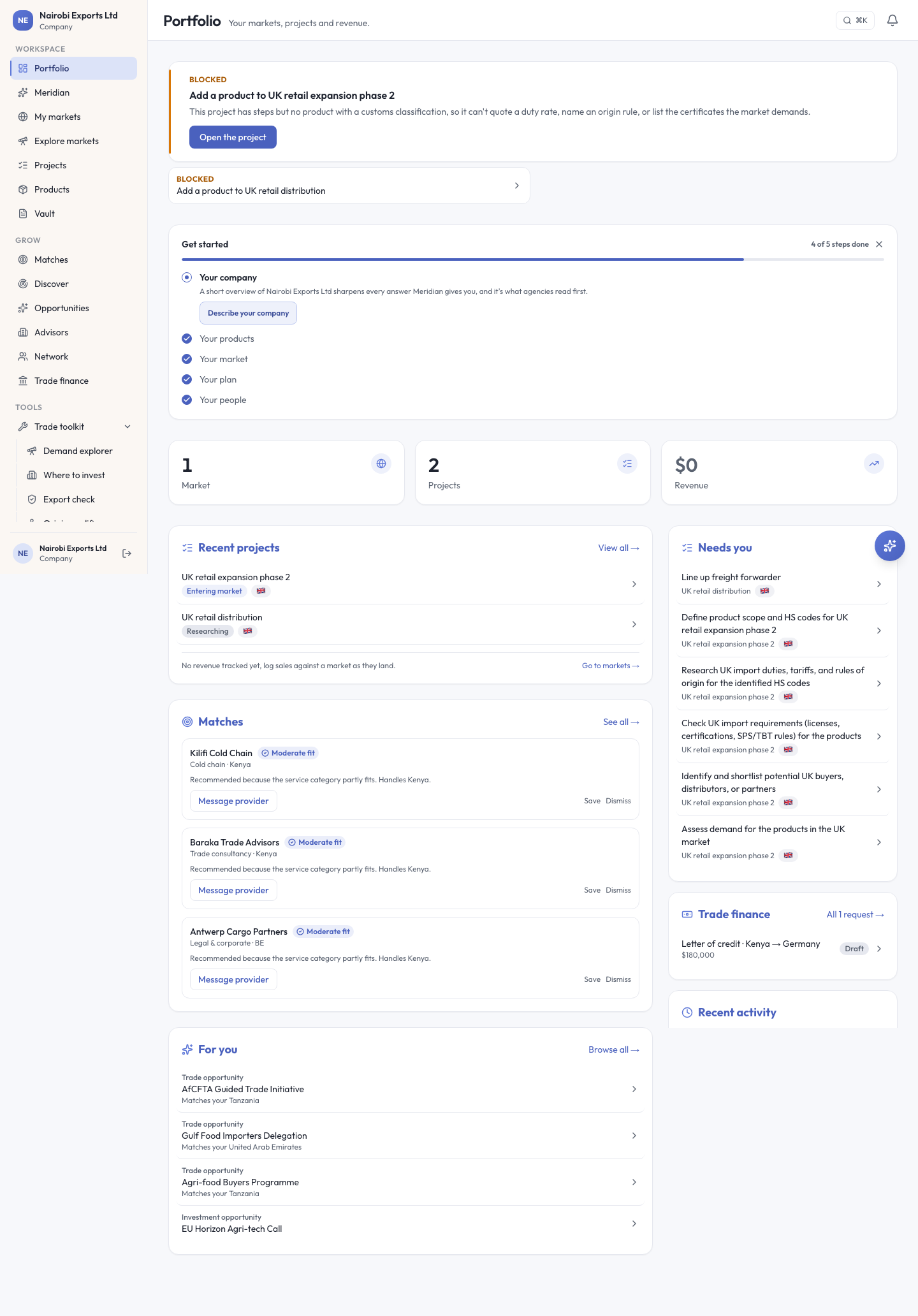
On the web, navigation is a left sidebar in five groups instead: Workspace (Portfolio, Meridian, My markets, Explore markets, Projects, Products, Vault), Grow (Matches, Discover, Opportunities, Advisors, Network, Trade finance), Tools (Trade toolkit, which expands), Learn (Knowledge, News & events), and Account (Team, Messages, Settings).
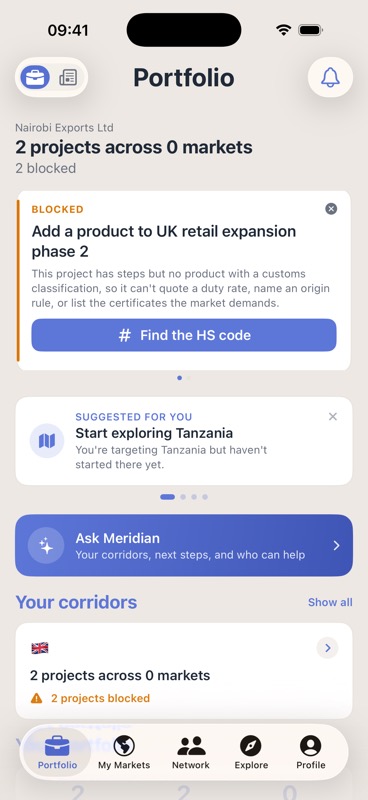
Same account, same records, same day, but the shape of a page can differ sharply. The Portfolio makes the pattern obvious: the phone leads with the one thing that is blocked and puts everything else a scroll away, while the browser lays the blocked projects, a get-started checklist, stat tiles, recent projects, matches, and a right-hand column flagging what needs your attention, all on one screen.
Products and the HS code
Your catalog is what turns duty numbers, document lists, and market rankings from generic into yours. Find it at Profile → Products & services on iPhone, or Products on the web.
The one field worth going back for is the HS code, a customs classification. The duty rate, the rules of origin, and the certificate list are all looked up by it, not guessed. Leave it off a product and a project can report itself blocked: the Portfolio card names the reason plainly. The project has steps but no product with a customs classification, so it cannot quote a duty rate, name an origin rule, or list the certificates the market demands.
A project on each platform
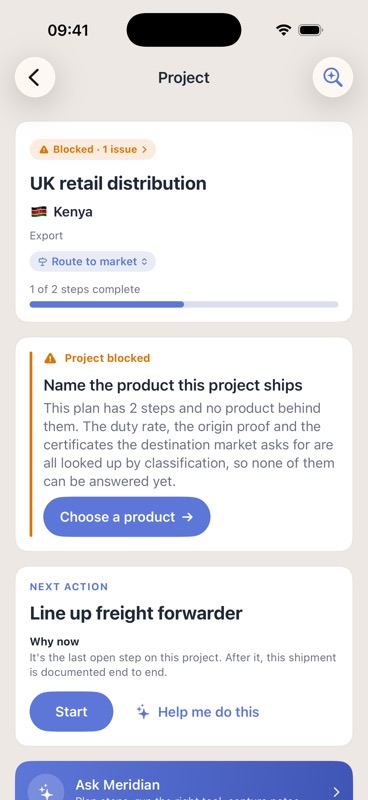
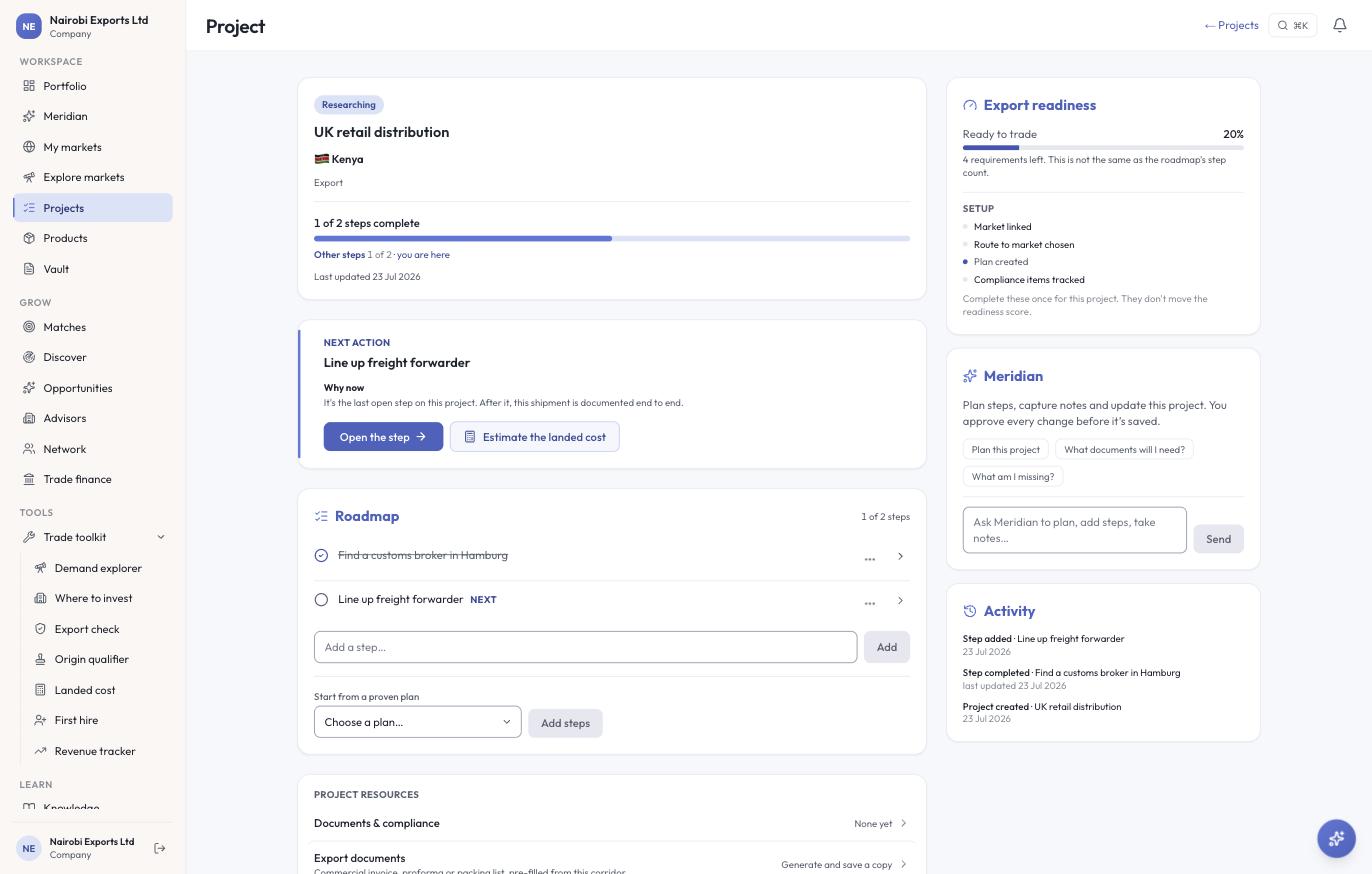
The status word is not the same on the two platforms, which is worth knowing before you build a habit on one. On iPhone, a project like this reads Blocked · 1 issue, with a full-width card naming the blocker and offering the fix. On the web, the same record reads by phase instead (Researching, say), and a missing product shows up as a quieter line on the projects list, plus an unticked item in a readiness rail. Neither is wrong, but if you work across both, the phone is the one that interrupts you about it.
What both agree on:
- The header carries one status and one progress figure, separately — a fraction like 1 of 2 steps complete, never merged into the status word.
- A next-action card that explains why this step, now, before the others. iPhone offers to start it or get help doing it; the web offers to open the step, plus the step’s own tool where it has one.
- A roadmap you own — steps tick off individually, you can add your own, and iPhone additionally lets you reorder steps and categories. Steps you wrote yourself carry no phase, and both clients group those last rather than inventing a heading for them.
- The same project resources — Documents & compliance, Notes, Revenue, and Sharing & collaboration.
Two things live on the web project page only: an export-readiness meter with a percentage, next to a setup group that is explicit about not moving that score, and an activity log of what changed and when. Meridian sits differently, too. On the web it is inline on the project page as a composer with starter questions; on iPhone it is behind a banner that opens a sheet. See Meridian, the built-in AI assistant for what it can do once you open it.
The toolkit and your AI budget
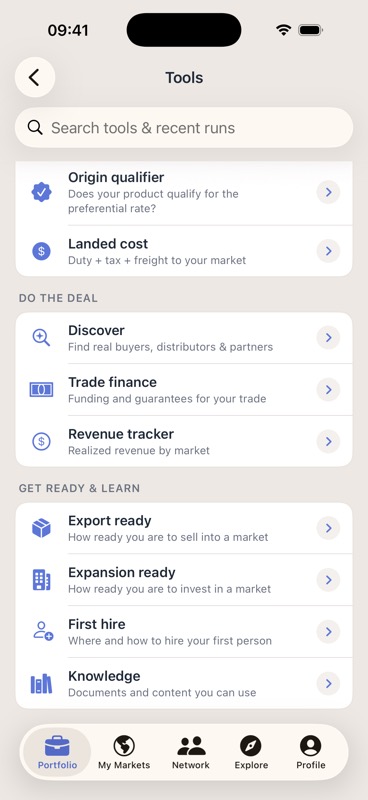
On iPhone, twelve tools sit in three groups, with a search field over tools and recent runs: Plan your market (Demand Explorer, Where to invest, Export check, Origin qualifier, Landed cost), Do the deal (Discover, Trade finance, Revenue tracker), and Get ready & learn (Export ready, Expansion ready, First hire, Knowledge).
The web files the same tools differently: Demand explorer, Where to invest, Export check, Origin qualifier, Landed cost, First hire, and Revenue tracker sit under Trade toolkit in the sidebar, while Discover, Trade finance, and Knowledge are promoted to top-level nav items. Same tools, different shelf.
One monthly AI budget covers every AI action on either platform: a Meridian turn, an accepted tool analysis, a match run, a Discover sweep, an HS classification. It resets at the start of each month, UTC, and an allowance you have paid for is never reduced during that paid period.
Reaching providers and advisors
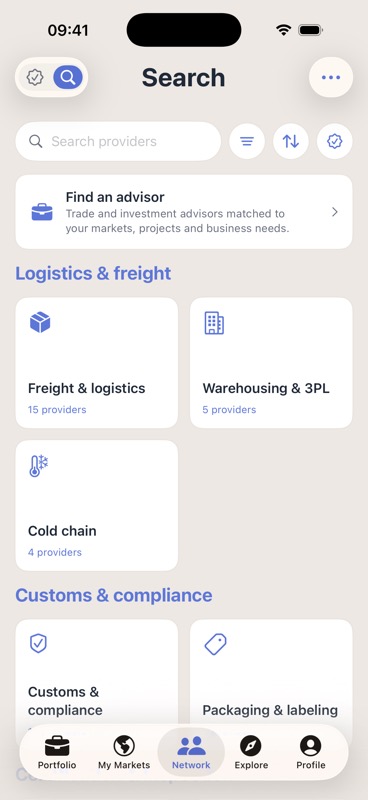
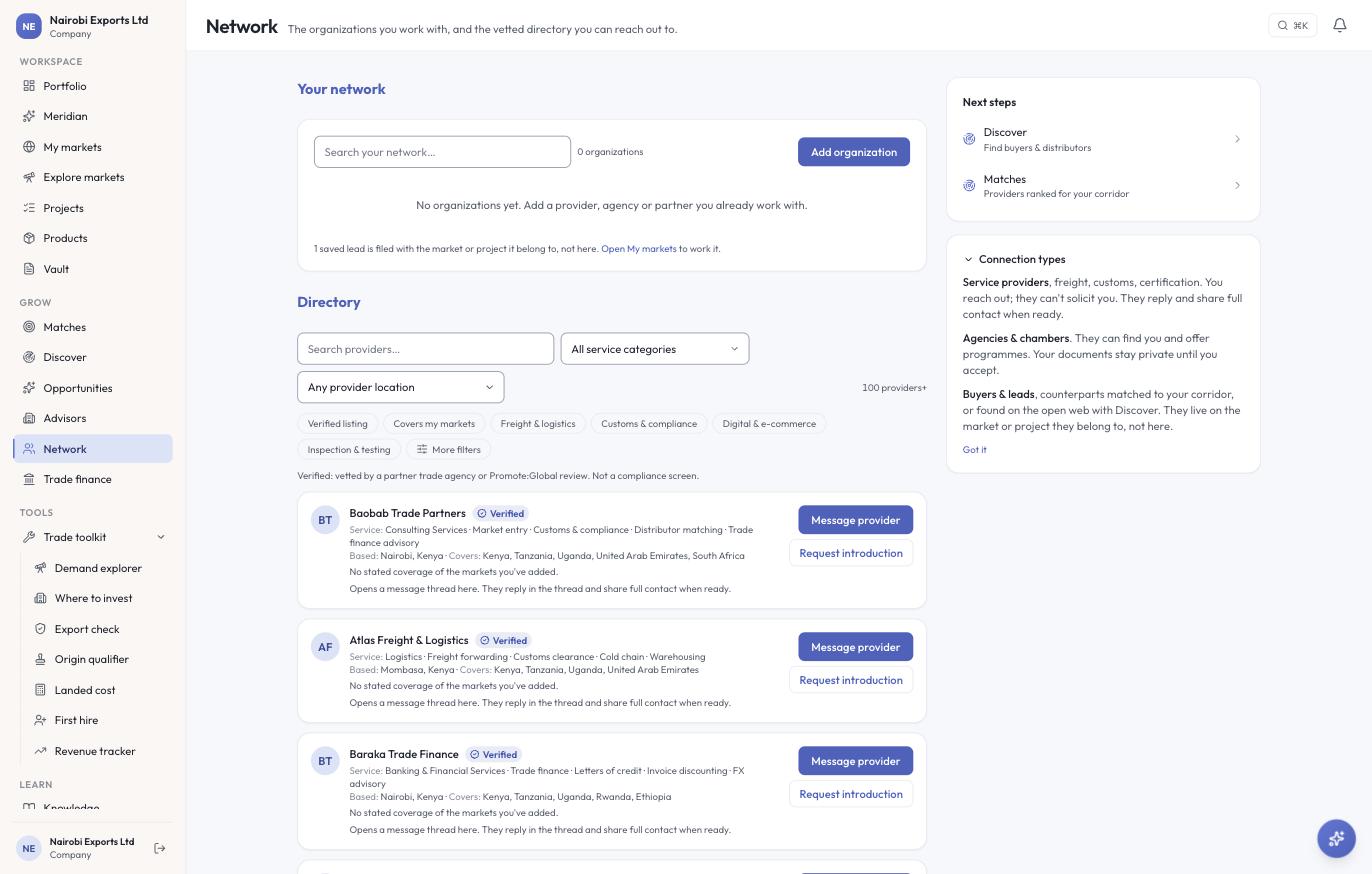
The directory itself looks different on each platform. On iPhone you browse by category first (a grid of groups such as Logistics & freight, Customs & compliance, and Certification & inspection, each tile carrying a live count of firms), then tap through to one. On the web you get one paginated list instead, a hundred-plus firms over several pages, with category and location dropdowns and filter chips above it: easier to compare many firms at once, harder to see how deep any one category runs.
Reaching a firm differs too. iPhone gives a firm’s page one primary action, named for the work rather than a generic prompt to contact (a customs broker offers to request customs support, for instance), alongside a relationship row marked private to your company, an action to save the firm without holding any of its contact details, and a screening step against sanctions and denied-party lists you can run right from the page. On the web, each directory row carries two actions instead: one to message the provider, one to request an introduction, both opening a thread where the firm replies and shares full contact when ready. What does not change: you initiate. A provider cannot contact you first, on either platform. It can only reply once you have reached out or accepted a connection it requested.
Firms list themselves in the directory. A listing can still carry a mark that means someone besides the firm stands behind it, and that mark is earned one of two ways: a named trade agency or chamber vouches for a firm it already knows, or Promote:Global reviews the firm directly and grants the same mark itself, with no agency name attached. Either way, it is a real judgment call about the firm, not a compliance check.
See Providers & advisors for how the directory, the request, and the relationship stage work end to end. This page only covers where the two platforms diverge.
Plan, team, and billing
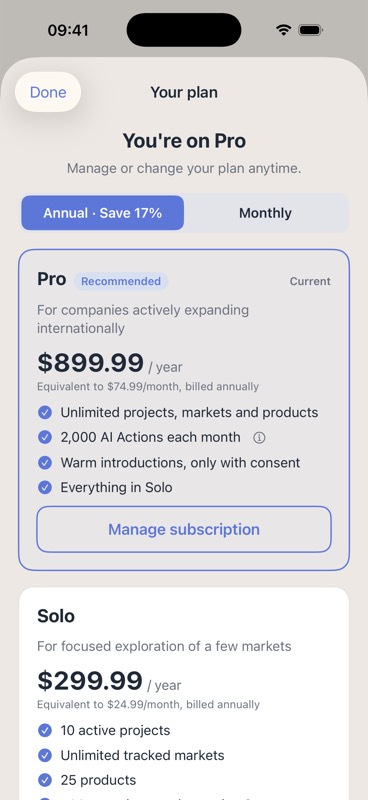
Where you buy a plan depends on the platform, and the two do not cross. On iPhone it is an in-app purchase through the App Store, and only Pro and Solo are sold there. On the web, billing runs through Stripe: checkout for Pro and Solo, and a billing portal where you can update your card, see invoices, and cancel. Current prices for every plan are on Plans & billing.
The web console itself is not part of what you buy. A Free account reaches the full web console, the same as Solo, Pro, or Work. There is no plan tier where the browser is locked and the app is not.
A Work account is a shared vault: every project, market, product, and deal in it syncs to everyone on the team. It is created when you or a colleague sets one up, and teammates invited from there share that one workspace. Until then, your markets, projects, and deals stay private to you alone.
Promote:Global processes no payment between you and anyone else on the platform. A fee your advisor quotes on an assignment is settled with them directly. Promote:Global charges subscriptions, and nothing else.
Looking for a provider or advisory account instead of a company one? Write to hello@promoteglobal.org and we will point you to the right console.