
Messages and notifications
Every conversation you have with a provider, an advisor or a trade agency lives in one place: Messages, at the top of the sidebar. Nothing about your company moves through email until you decide it does.
How a thread opens
A conversation starts one of four ways, and all four are started by you or accepted by you.
- You message a firm from its page in the Service directory.
- You send a structured request, which carries a project and a market with it.
- You request an advisory, and the firm replies in the thread.
- You accept an introduction somebody asked for.
On an account with nothing yet, the page says so plainly: Threads open when you connect through an introduction or reply to an inbound request. A firm cannot open one with you out of nowhere.
The inbox
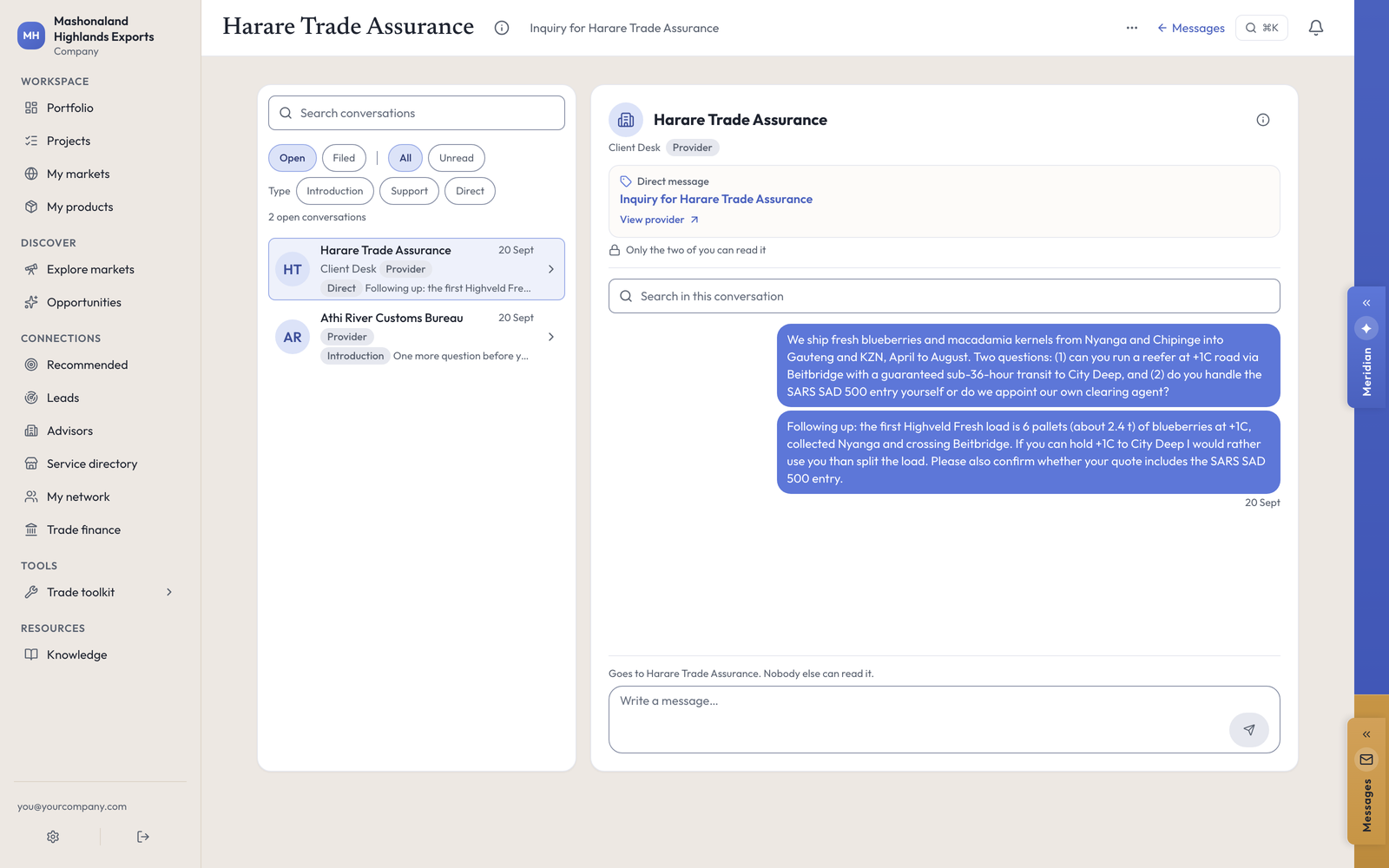
The left column lists your conversations with filters for Open and Filed, All and Unread, and by type: Introduction, Support, Direct. Each row shows the firm, what kind of thread it is, and the last line sent. There is a search box over the list, and another inside a conversation.
Open a thread and the header names the firm and the subject, with a link back to their listing. Above the conversation: Only the two of you can read it. Just above the box: Goes to [the firm]. Nobody else can read it.
Write what you would write in an email. Mashonaland Highlands asked a Harare freight firm two specific questions — can you run a reefer at plus one degree by road via Beitbridge with a guaranteed sub-36-hour transit, and do you lodge the South African customs entry yourself or do we appoint our own clearing agent. Specific questions get specific replies.
Filing a thread takes it out of Open. It does not delete it and it does not tell the other side anything.
Where a request goes
A structured request is not just a message. It carries the project and the corridor it is about, and it moves through stages that both sides can see. Sent requests are listed under their own view, and an advisory request also appears on the Advisors page under Your advisory, with the firm, the project, the stage and the next step.
Notifications
There is a bell in the top right of every page. It carries platform activity: things happening on your projects, introductions, and support partners. Messages themselves ride the Messages item in the sidebar rather than the bell. [not exercised — no notification arrived during this run, so the bell was seen but never fired.]
Push notifications to a phone are an app feature and were not part of this walk. [not exercised.]
Activity, which is not the same thing
Two other places record what happened, and neither of them is a message.
- A project’s own Activity card lists every change to that project: steps added, steps completed, a document saved, a compliance item tracked, revenue logged, each with a date. It is the fastest way to see what a colleague did.
- The Portfolio’s recent activity does the same across every project and market, grouped by market and amount.
In the console
Each of these pages carries an (i) beside its title. This is what it says, and where it sends you next.
- Messages
Where your conversations live, open and filed.
- Requests you sent
What you asked a provider or an advisor for, and where each one stands.
- Your request
One request you sent: what you asked for, what travels with it, and where it stands.
- Notifications
Platform activity on your projects, introductions and support partners.
What to do next
- Reply to anything open. A thread with no reply in it does nothing for you.
- Ask one operational question of one firm, with a real number in it, and see what comes back.
- Read Finding people for how a thread gets started in the first place.