
Meridian
Meridian is an AI assistant that can see your own workspace. It is on every page of the console, it knows what you are looking at, and it works from your real products, your real corridors and your real plan. Over one day, Mashonaland Highlands asked it 226 questions.
Read the line under every answer before you act on one: Meridian is AI. Verify before acting. It was on all 226.
The dock
There is a narrow blue spine down the right edge of every page. Click it and Meridian opens beside the page rather than over it, so you can still see what you are asking about. Drag the edge to make it wider. The first time you see it, a small card explains it, and it stays dismissed once you dismiss it.
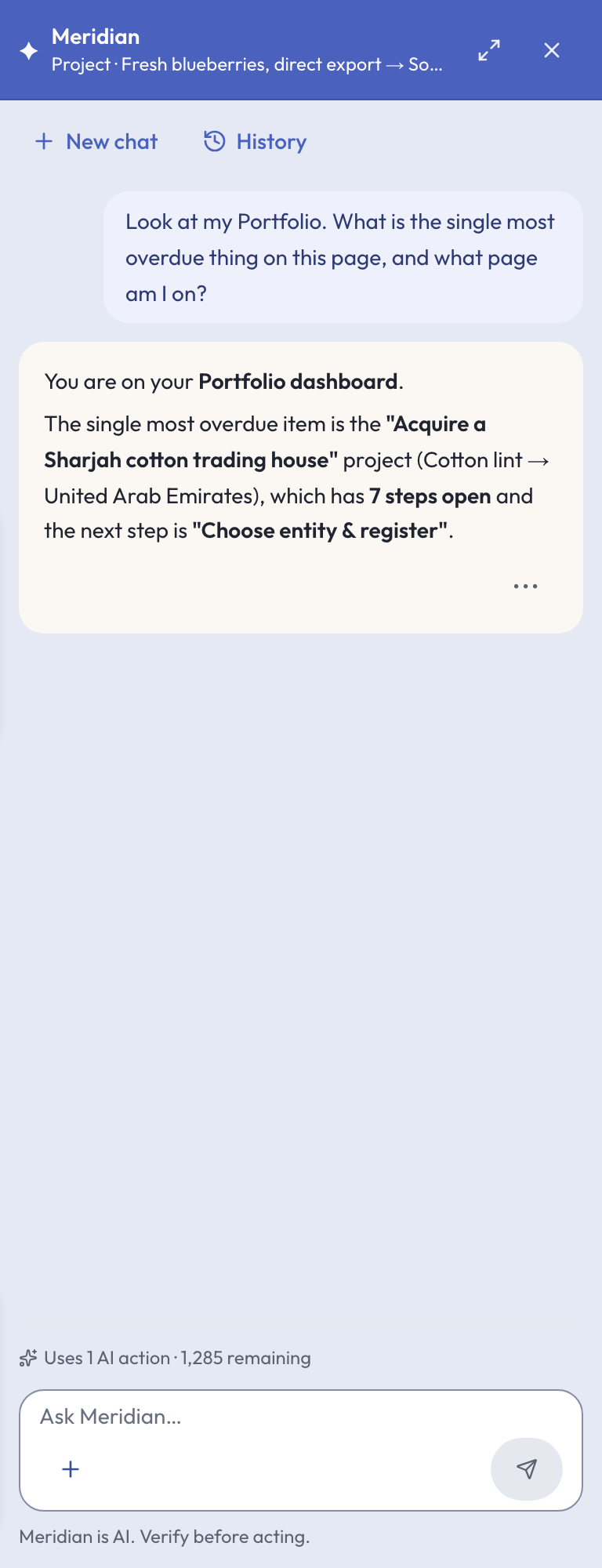
The line at the top of the dock is the important one. It names what Meridian thinks you are looking at, and it changes as you navigate:
- Project · Fresh blueberries, direct export → South Africa on a project page.
- Step · Confirm duty and landed cost into South Africa once a step drawer is open.
- Market · China on a market workspace, and similar lines on the Portfolio, a country page, a provider page, Trade finance and your products.
Check that line before you spend an action. If it names the wrong thing, close the drawer or navigate first. On a couple of screens it has been seen naming the page by an older title than the sidebar uses, so if an answer describes a screen you are not on, that is why.
Asking at three levels
The same dock answers at three depths, and the answer gets sharper as you go down. Mashonaland Highlands asked all three on each of its eighteen South Africa projects.
- Project level, from the project page. Good for “what should I do first here”, “is this the right entry method”, “compare this market with that one”.
- Step level, from inside a step drawer. This is where it is strongest. Ask what the most common failure on this step is, what a customs officer will actually look for, what the document has to say.
- Subtask level. Name one of your own subtasks in the question and ask it directly. Open the step drawer first — your subtasks reach Meridian from inside the drawer, not from the project page.
The workspace
Meridian in the sidebar opens the full page: a composer in the middle, and every conversation you have had down the left, searchable, with New chat at the top.
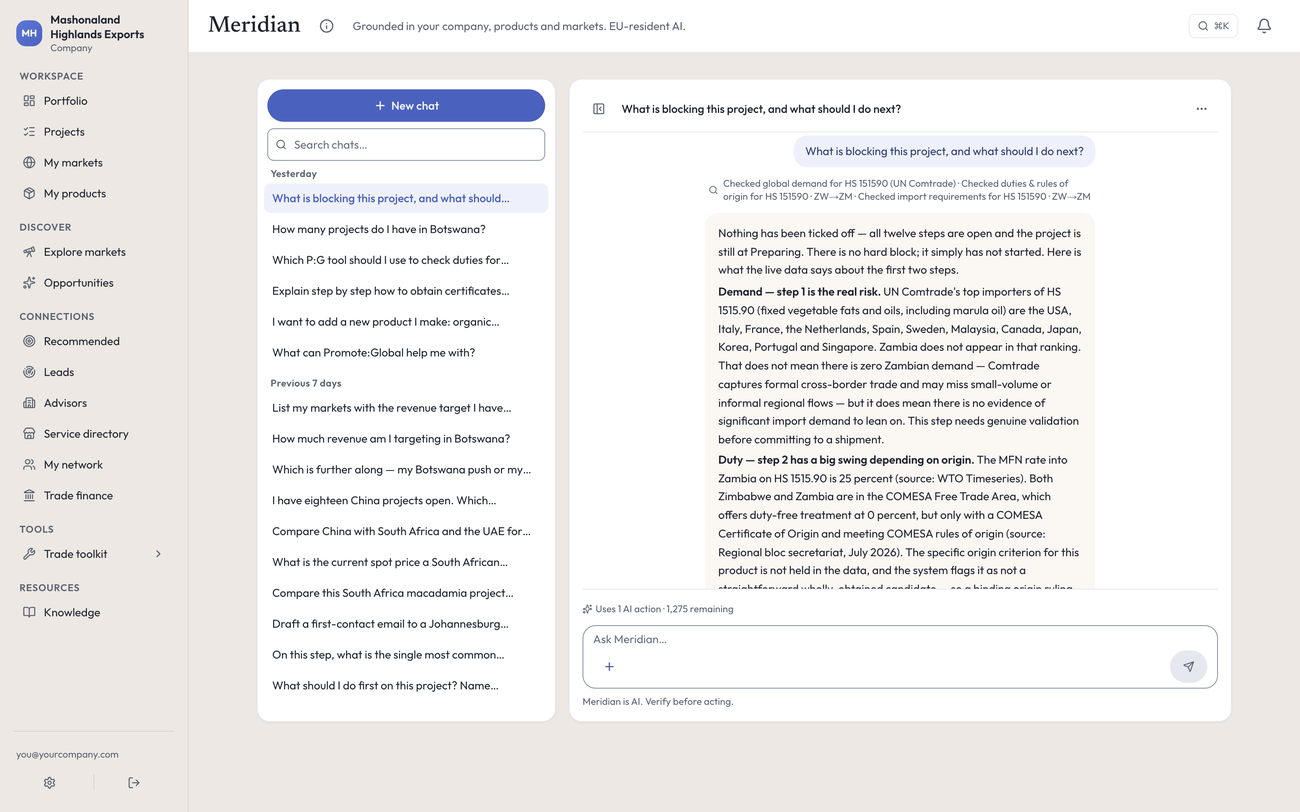
Use New chat when you change subject. The dock restores your account’s last conversation, so if a colleague on the same account was asking about a different market, that thread is what you will see under your own context line. One click fixes it.
Conversations are titled from the first thing you typed, so give a question its own opening sentence if you want to find it again. Asking eighteen projects “what should I do first here” produces eighteen rows that read the same.
The + button beside the composer lists what Meridian can do on this page. It can also propose an action — creating a project, setting a market’s revenue target — as a card you approve or decline. Nothing is written until you approve it.
What it costs
One question is one AI action. The price is printed on the control before you press it, with your remaining allowance beside it: Uses 1 AI action · 1,285 remaining. Over 248 actions in one day, the meter moved by exactly the amount printed, every time. Tool runs Meridian does on its own to answer you are marked Read-only: ran automatically, nothing saved to your workspace and are not charged separately.
See Your plan and usage for the monthly allowance.
What it is good at
- Your facts. Answers use your real product name, your real HS code, both real countries, the assumptions stored on the project, and the plan’s own step titles. Nothing is generic.
- Showing its work. Each answer prints what it consulted first — Checked duties & rules of origin for HS 080262 · ZW→ZA · ZW→CN — then answers with dated, sourced figures. Macadamia kernels: 0 percent into South Africa, 24 percent into China, each with its year and source.
- Saying no. Asked for a commodity spot price it declined and named real places to get one. Asked whether a joint venture is required for black granite in China it said no blanket requirement exists and that assuming otherwise is where people fail. Asked about macadamia demand in South Africa it said South Africa is a net exporter, not a major importer, and that low or falling volumes are a reason to reconsider the market.
- Correcting the plan. Asked whether a goods export plan was right for a software project, it said no, explained that no sea freight or certificate of origin applies, and named the rules that actually bite. Asked the same about a licensing project it produced the eight steps that do apply. When Meridian and the composed roadmap disagree about whether a step belongs, Meridian has been right.
The one kind of answer to check
If Meridian says you do not have something that is on the screen in front of you, believe the screen. There are fields of your own that it cannot see yet, and when it cannot see one it can report that as you not having it.
Measured cases, all from one day:
- It said no revenue targets were set, on a page printing a $5.6m target two lines above the dock.
- It said the company overview was blank, on the settings page displaying the paragraph.
- It said a project had no saved notes, next to a Notes card reading “2 notes”.
- It said a project had no compliance documents, with two of them named in the activity feed below.
- It counted 14 products for a company holding 20, because it counts goods under a heading that says products.
- Asked what Promote:Global’s guidance for China contains, it described a five-section market brief. There is no written guide for China, and the page it was answering on says so. See Your markets.
The pattern is the same every time: it is an answer about your own records, and it is negative. Meridian is reliable about the outside world — duties, rules, agencies, what a market requires — and it will tell you when it cannot know something out there. It is the “you don’t have that” answers about your own account that deserve a second look at the page.
Two more habits worth keeping. When it drafts an outreach email, read it for claims you have not earned before you send it — one draft described a track record the company did not have. And counts it gives are exact while lists are often a sample: it will tell you it has listed 20 of 55 projects, and that warning is real.
In the console
Each of these pages carries an (i) beside its title. This is what it says, and where it sends you next.
- Meridian
Every Meridian conversation on this account, in one place.
What to do next
- Open a step, open the dock, and ask what the most common failure on that step is. That is the single best question to start with.
- Ask it to compare two of your markets on the same product. It will fetch both corridors and answer with sources.
- Read Meridian, the built-in AI assistant for what it works from and where its limits are.