
Your products
Your catalog is the part of the account that makes everything else specific. A duty rate, a document list, a market ranking and a buyer search all read from it. Fill it in once and the rest of the product stops being generic.
You will find it under My products. Mashonaland Highlands put twenty things in it: fourteen goods and six services.
Goods and services are not the same thing
There is a toggle on every product for which one it is, and it matters. A good is something that crosses a border in a container: blueberries, macadamia kernels, granite blocks, hides. A service is work you sell rather than ship: freight forwarding, agronomy advice, tobacco grading, software development, a safari itinerary.
Mark services as services. Three things in the product read the flag and behave correctly: the editor stops asking for a customs code, the completeness ladder stops counting one against you, and sign-up routes you differently.
What does not read it yet. The roadmap a project builds is written for goods. Start a project on a service today and it will compose steps about sea freight, an export pack and an origin certificate, none of which apply. Use the plan for the parts that do apply, delete the steps that do not, and ask Meridian for the real critical path — it answers correctly about services even where the plan does not. See Projects.
HS codes, without the jargon
An HS code is the number customs uses to say what your goods are. It is the same first six digits in almost every country in the world. Fresh blueberries are 0810.40. Macadamia kernels are 0802.62. Flue-cured tobacco leaf, whole and not stripped, is 2401.10.
Getting it right is worth an hour, because four separate things are looked up by it:
- the duty percentage the destination charges you;
- the rule of origin, which decides whether a lower agreement rate is even available;
- the certificates and documents that country asks for;
- the import data that tells you who already buys this and at what price.
A project with no confirmed code reports itself blocked and says why. That is the product working, not failing.
You can type the code in yourself, for free, and it is kept exactly as you type it. Or press Suggest in the Classification section and describe the product in your own words. That costs AI actions and the price is on the button before you press it.
Check what it suggests. Asked to classify grade-sorted flue-cured Virginia leaf, baled to 200 kg, the suggestion came back as 2401.20, which is tobacco that has been stemmed or stripped. The right answer for whole baled leaf is 2401.10. Nothing in the description said stripped. If your product has a fork in it — whole or milled, bulk or retail, raw or processed — put that fact in the description, and read the answer against the heading before you accept it. The code drives your duty; a wrong one is expensive at a border.
Readiness, and what it buys you
Each product carries a match readiness figure with a word beside it: Basic, then Match-ready. The number is not a score of your company. It is a count of how much of this record is filled in, and the panel names what each missing field would improve.
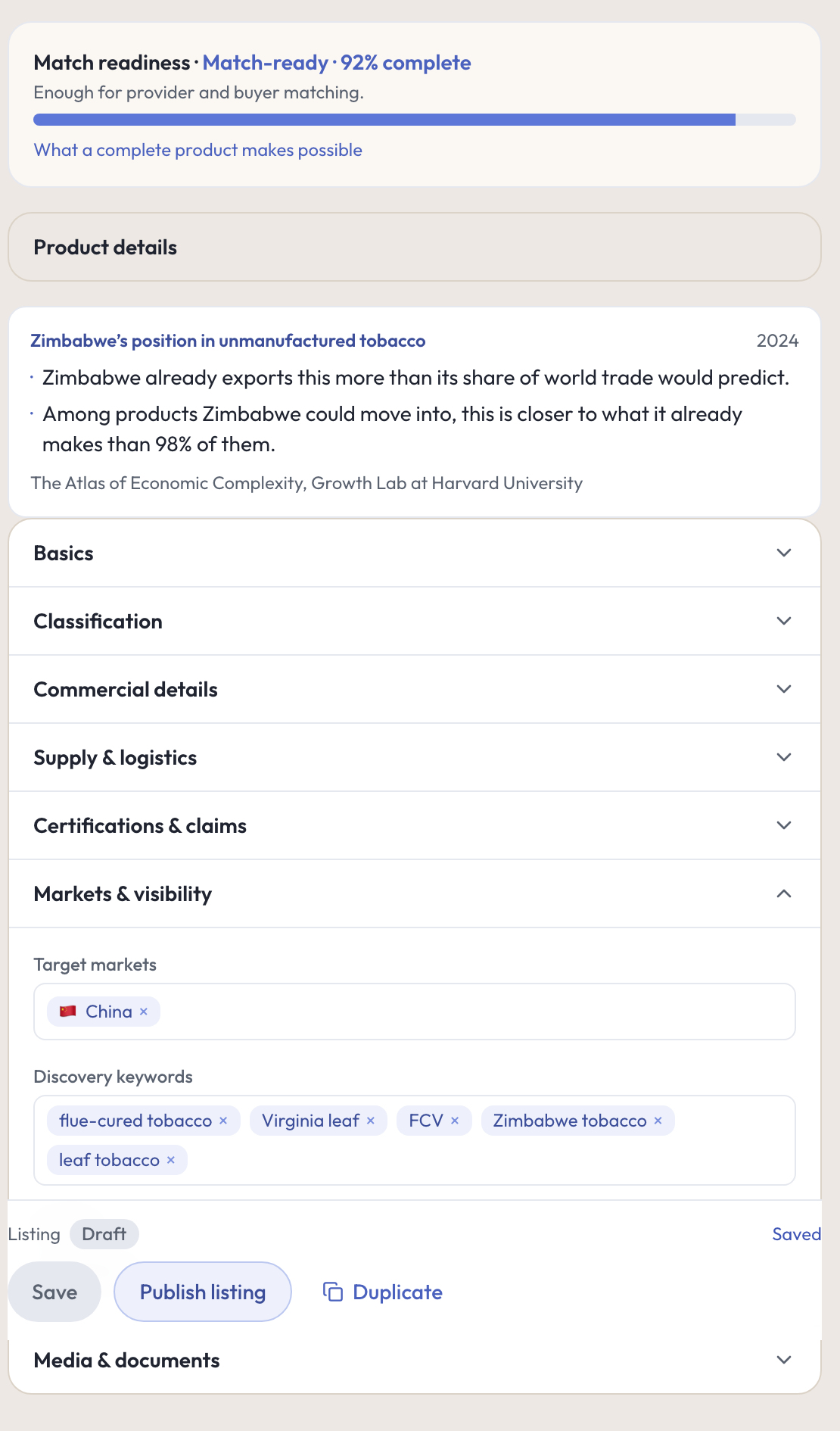
Readiness matters because matching reads it. A thin record can only be ranked on the little it holds. Mashonaland Highlands’ twenty products all reached Match-ready, between 83 and 92 percent, which took: a real description, the HS code, unit of sale, capacity, minimum order, lead time, certifications, and the markets the product is aimed at.
The editor has seven sections — Basics, Classification, Commercial details, Supply and logistics, Certifications and claims, Markets and visibility, Media and documents. Opening one closes the last, so work down the list rather than jumping about.
Photos and spec sheets are uploaded in the iPhone app, not the browser. A web-only account tops out at Match-ready and cannot reach the tier above it. [not exercised — this run was web only; the app upload was not tested.]
Two things worth using
Build my product profile. Describe the product in a sentence and it fills in the category, discovery keywords, attributes and unit of sale, and proposes an HS candidate. It is priced on the button. What makes it trustworthy is what it does with the answer: the code goes into a candidate field for you to confirm, not into the code field, and every field it guessed is stamped as a guess. Certifications come under a heading that says outright that it cannot confirm you hold them.
The trade position note. Once a code is confirmed, the product page prints a short, dated, attributed note on where your country stands in that product. For Zimbabwe and unmanufactured tobacco it read: Zimbabwe already exports this more than its share of world trade would predict, and among products Zimbabwe could move into, this is closer to what it already makes than 98 percent of them. Source: the Atlas of Economic Complexity at Harvard. That is real evidence for a board paper.
Publishing a listing
Saving a product keeps it to yourself. Publish listing makes it findable by buyers on the platform, and the confirmation says so plainly before you commit. You can pause or unpublish afterwards, and those are two separate buttons rather than one ambiguous toggle. There is a completeness threshold before the button opens, which the page states as a fraction of the fields.
In the console
Each of these pages carries an (i) beside its title. This is what it says, and where it sends you next.
- My products
What you sell, and how ready each one is.
What to do next
- Add every product you would actually sell abroad, not just the flagship. Twenty is not too many.
- Confirm an HS code on each good, then open Your markets.
- Or go straight to a plan: Projects.