
Your markets
A market is a country you have decided to work on. Adding one gives you a workspace for it: a revenue target, the projects filed against it, the partners you found there, and the country’s own live data. Mashonaland Highlands added three: South Africa, China and the United Arab Emirates.
Explore, then add
Explore markets lists every country, grouped by region, with filters for Africa, the Caribbean, the Americas, Europe, the Middle East, Asia and the Pacific. For you leads with the countries that match what you already sell or where you already work. Compare puts candidates side by side. Find the country, press Add market, and it appears under My markets.
Then set a revenue target on it. That number is yours, typed by you, not a forecast by us. It is what the Portfolio measures realized revenue against, and with nothing in it the percentage columns have nothing to mean.
What a market actually gives you today
This is the part to be straight about, because it decides whether the rest is worth your time. Six countries out of 197 have a written brief. The other 191 have live data only. The six are Grenada, Kenya, New Zealand, Tanzania, Tunisia and Uganda.
The product says so before you click anything. Explore markets heads its Browse view Every country, A to Z, with the written briefs marked, and under the list it says 197 countries, A to Z. The 6 with a written brief are underlined. There is a Has a brief · 6 filter, and switching it on prints 6 of 197 countries and lists them.
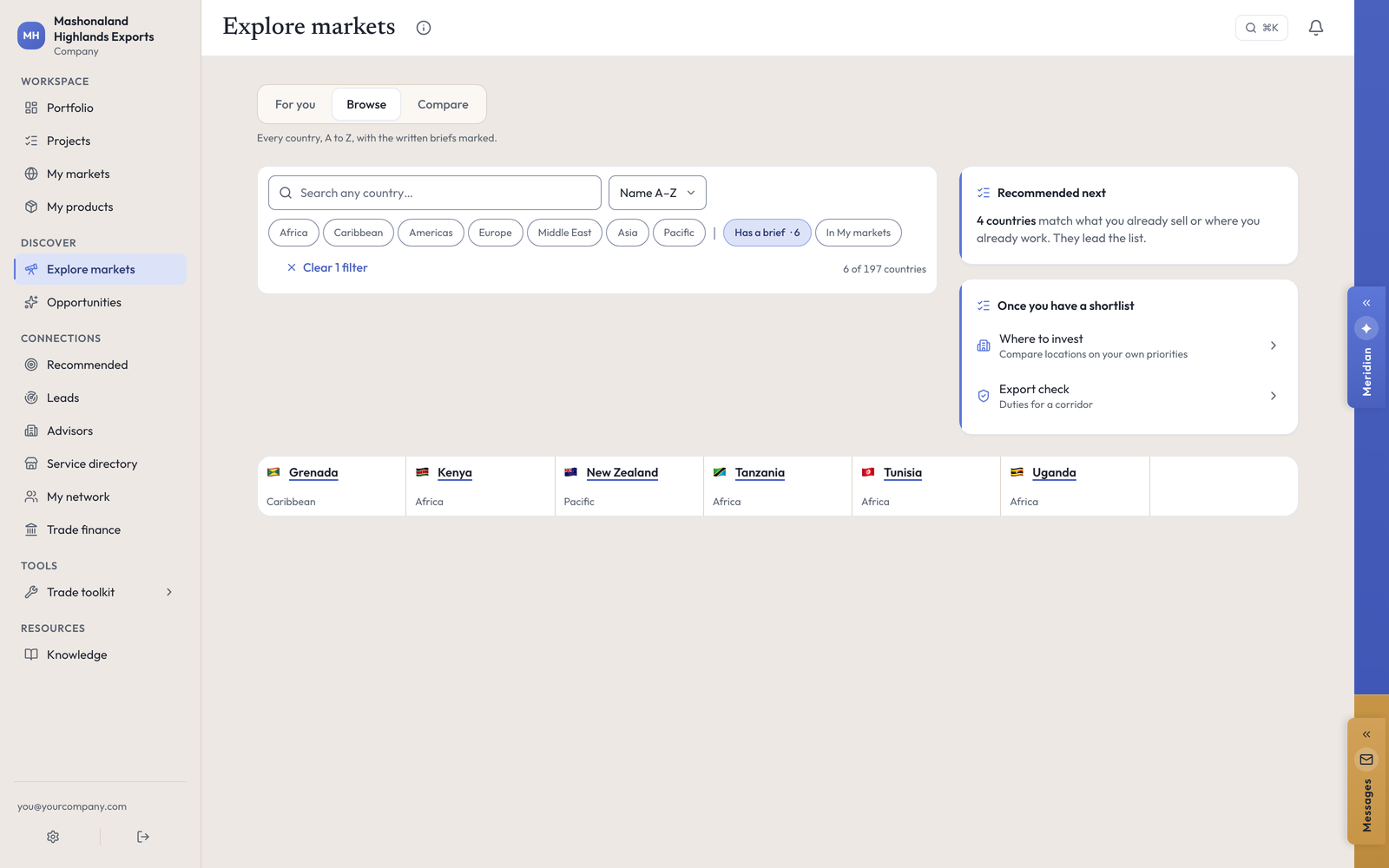
For a Zimbabwean exporter, those six are worth nothing. South Africa is not on the list. Neither is China, the UAE, the EU, the UK or the United States. So set the expectation correctly: for almost every market you will open, there is no written guide, and the country page tells you so in its own closing line — No written guide for South Africa yet. Everything above it is read live all the same.
What is on a country page instead
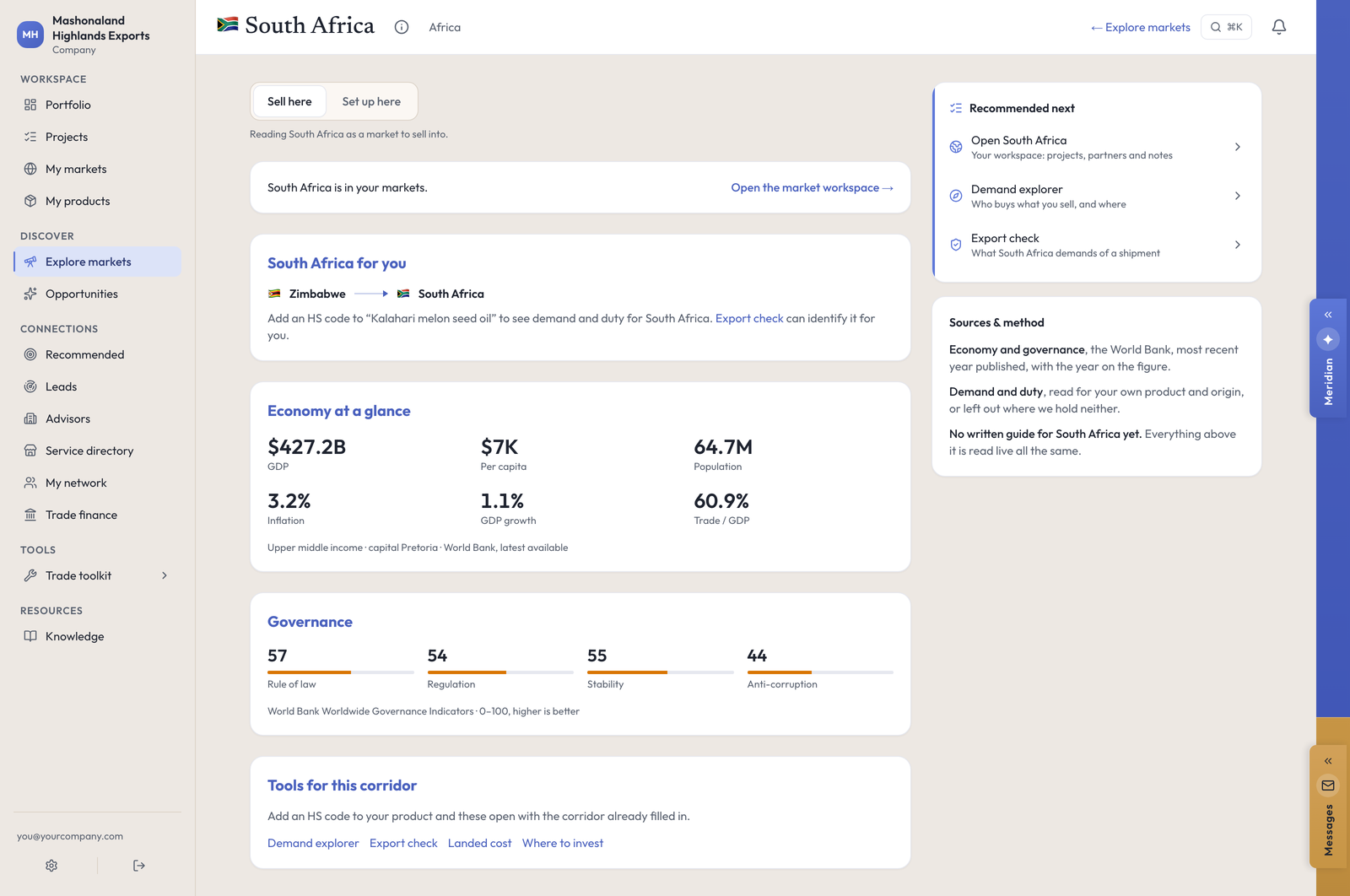
South Africa, on the day of this walk, gave us all of the following:
- Economy at a glance — GDP $427.2B, $7K per head, population 64.7M, inflation 3.2%, growth 1.1%, trade at 60.9% of GDP. Attributed to the World Bank, most recent year published.
- Governance — rule of law 57, regulation 54, stability 55, anti-corruption 44, on a 0 to 100 scale where higher is better, from the World Bank Worldwide Governance Indicators.
- Business climate — empty, and it says why: a 0 to 100 ease-of-doing-business score appears here when the World Bank publishes one for South Africa, and it has not yet. An honest hole beats a filled one.
- Market pulse — nine current indicators including the exchange rate, the policy rate and port container volumes.
- Policy watch — recent trade measures, each linking out to the source.
- Official support bodies — public agencies for this corridor, with their contact routes.
- Sourced duty lines for your own HS codes, dated, with the source named.
- A project starter at the foot, pre-loaded with every product you hold and eighteen ways into the market.
For China it also gave three genuine CCPIT bodies with working phone numbers, and the plan it composed carried China-specific compliance steps that no generic country brief would have contained: facility registration under Decree 248, and entry inspection and quarantine.
Read Policy watch carefully. Some measures are tagged Restricts trade when they do nothing of the kind — a trade-finance agreement between two banks and a government equity injection both carried that tag on the South Africa page. Open the outbound link and read the measure before you treat it as a barrier.
The market workspace
My markets → a country opens your own workspace for it, which is a different page from the country page. It carries your revenue target against what you have realized, the requirements pulled from your own project plans for that country, the partners and leads you saved there, your notes, and the project starter.
The revenue block sits at the top and is the largest thing on the page. Read the labels: Realized is money you logged, Potential is the target you typed, and Captured is one divided by the other. None of it is a forecast.
The project starter is at the foot, under everything else. It is the control that actually starts work, so scroll down to it.
In the console
Each of these pages carries an (i) beside its title. This is what it says, and where it sends you next.
- My markets
Markets you're working in.
- Explore markets
Find a market, then add it to your work.